
On September 28 I published ai-running-coach, Nine Days Later. It covered everything up to PR #122: the dashboard, the trail metrics, the guardrails and the coach in my pocket through Claude Code Remote Control.
Five days later, the repository has 27 more merged pull requests (#123 to #162), 88 commits and about 64,000 new lines, most of them tests and documentation. This post goes through each of them: what it is for, and how it works under the hood.
A note on the screenshots. I took all of them for this post, on a real instance of the app running in a sandbox. Because I didn’t want to publish my own health data, the instance uses the project’s demo workspace: “Camille”, a fictional athlete preparing a 42 km trail race, generated by the same code the tests use. The dashboard is in French (the project’s default language). The sandbox couldn’t reach the map tile servers, so the GPS map below is shown in the app’s offline mode: the track with no background tiles.
0. Start with the video#
The easiest way to see the project is the trailer. It is not a video file. Every frame is drawn in JavaScript on a canvas, so it runs right here in the page:
Press Play (sound on). You can switch the narration between English and French, turn on subtitles, or jump to a chapter on the elevation profile. Open it full page or see all the episodes.
This happened in three steps:
- PR #128: an 80-second presentation. Every frame is a pure function
render(t)of the elapsed time, drawn on a 16:9 canvas. There is no video file and no build step. The fonts (Inter, Sora, JetBrains Mono) are bundled with their OFL licences, so the page makes no request to a third-party service. If you need an MP4,scripts/render_video.pyrenders it frame by frame with headless Chrome and ffmpeg. - PR #157: “The Trail” (Le Sentier), a series of 12 narrated episodes plus a trailer. There is one episode per feature, halfway between a demo and documentation, and each one is staged like a trail race. A race bib opens it, the chapters are aid stations you can click on an elevation profile, and a finish arch links to the matching documentation page. All episodes share one engine (player, chapters, subtitles, drawing helpers). Narration is generated offline from a script, with a pronunciation lexicon (IPA) so the voice says “HRV” and “/today” properly, and WebVTT subtitles are generated alongside. The screenshots in the episodes are real captures of the dashboard on the demo workspace (31 of them), and the chat scenes replay a scripted conversation through a mock backend, so no LLM is called.
- PR #161: better voices. The first narration used Kokoro, which runs fully offline but sounded robotic.
video_narration.pynow accepts several engines (kokoro,azure,edge,kyutai,chatterbox), and the series was re-narrated with Microsoft’s multilingual neural voices (Remy in French, Andrew in English).
To answer the obvious question: yes, because it’s HTML and JavaScript and not a video file, I can embed the player directly in the post with an iframe pointing at the project’s documentation site. It stays in sync with the docs: when an episode is updated there, this page shows the new version.
1. Talking to the coach from the dashboard#
In the last post I explained why my phone talks to the coach through Remote Control: a home-made front end can’t use a Claude Pro/Max subscription. That’s still true. But sometimes I just want to type a question in the dashboard I already have open. So there is now a Coach page in the dashboard (PR #130, the largest of the batch at around 15,000 lines).
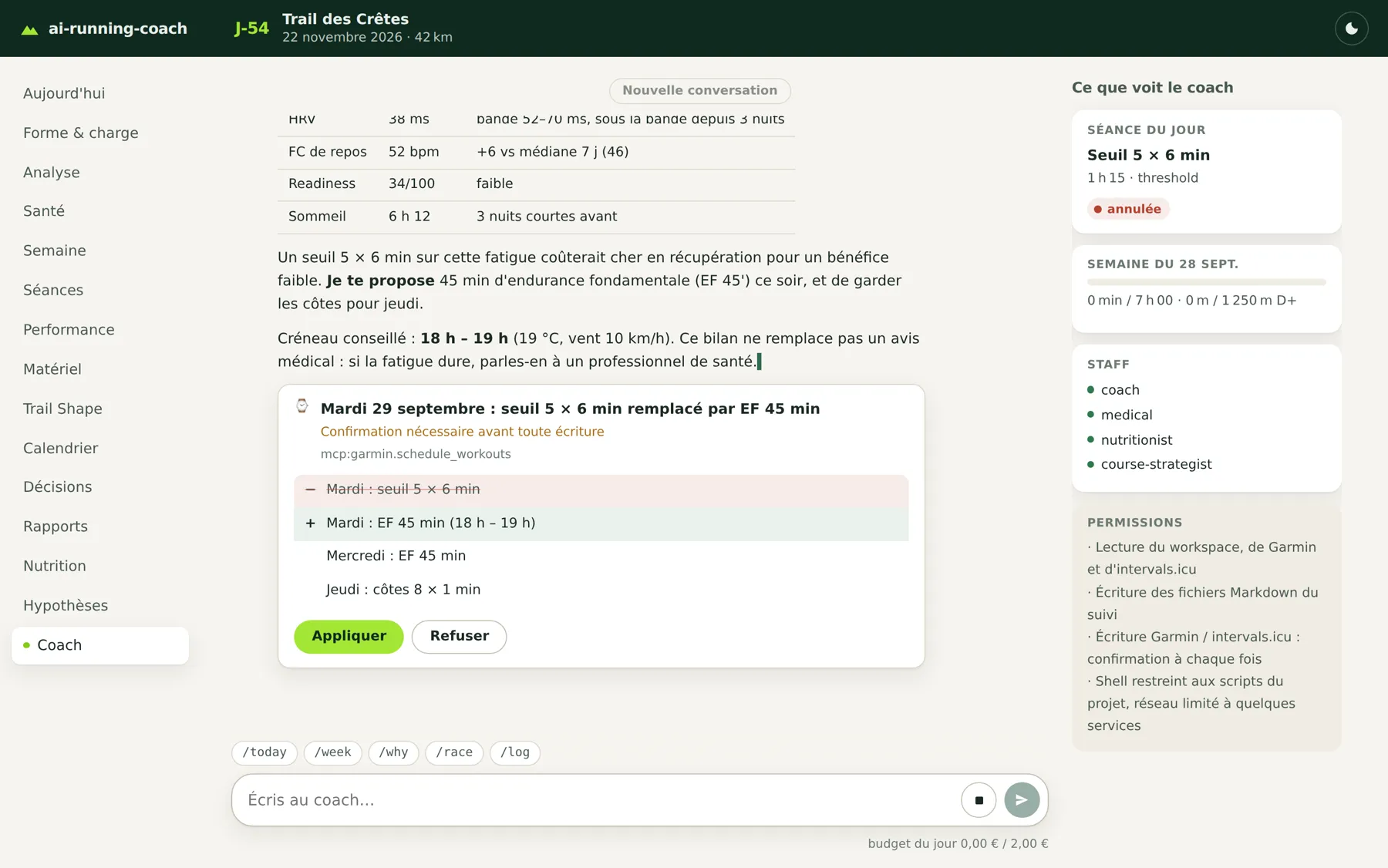
The athlete says they feel drained before a threshold session. The coach checks HRV, resting HR, readiness and the weather, proposes to replace the session, and waits. Nothing is written to Garmin until “Appliquer” (Apply) is pressed.
How it works:
- It’s a separate service. The dashboard stays read-only and never sees an API key. A dedicated process,
scripts/arc_chat.py, runs on the coach machine and is the only part that writes to the workspace. - Same agents, same files. It uses the same agents, skills, Garmin MCP server and markdown files as a session in the IDE. The chat doesn’t add a new source of truth.
- Two backends. You can use the Claude Agent SDK (the engine behind Claude Code, default model
claude-sonnet-5-5) or an OpenCode server with any OpenAI-compatible API, OpenRouter for example. - Every write to Garmin or Intervals.icu needs your approval. A card shows the before/after and you accept or refuse, either on the page or from the push notification. An approval is single-use: a second identical call shows a new card.
- A strict permission policy. The shell is limited to the project’s own scripts, with their options checked against each script’s
argparse. A lint test fails if a skill calls a script the policy doesn’t know about, so the policy can’t drift away from the skills. - Budget. A counter shows the cost of the conversation, there is a daily cap, and each turn reserves its own budget (1 € by default) so a late approval can still finish.
- Everything is traced. Each tool call appears in a numbered, collapsible trace, and only the final answer stays visible.
I tested eight models on OpenRouter, on a real workspace with Garmin in read-only mode, using three real requests with automatic checks (/log, a morning check, /week). DeepSeek v4.1 Flash came out first: it scored best and was the cheapest, at about €0.80 for a typical month of use. Claude Sonnet is the best fit for the delicate decisions, but it is more expensive (about €30 a month, estimated). The full comparison is in the chat documentation.
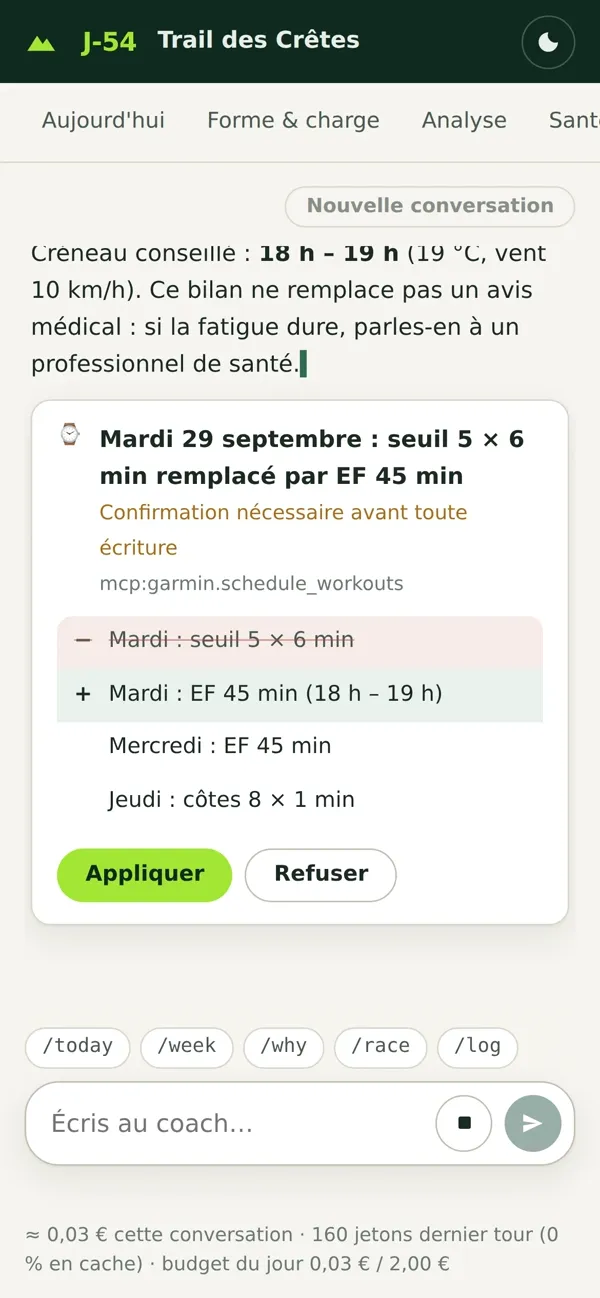
On a phone, the page shrinks to the conversation, and the approval card stays within reach of your thumb.
Two follow-ups made it practical to deploy: PR #156 runs the chat in its own container next to the dashboard, behind the same Traefik with SSO (/api/chat behind single sign-on, /api/chat/approve with a token, POST only, rate-limited), and the project’s /coach-doctor now checks that the chat service is reachable and healthy.
2. The session page gets a GPS map#
The FIT ingestion has stored GPS coordinates since the start, but nothing displayed them. PR #160 rebuilt the session page around a map:

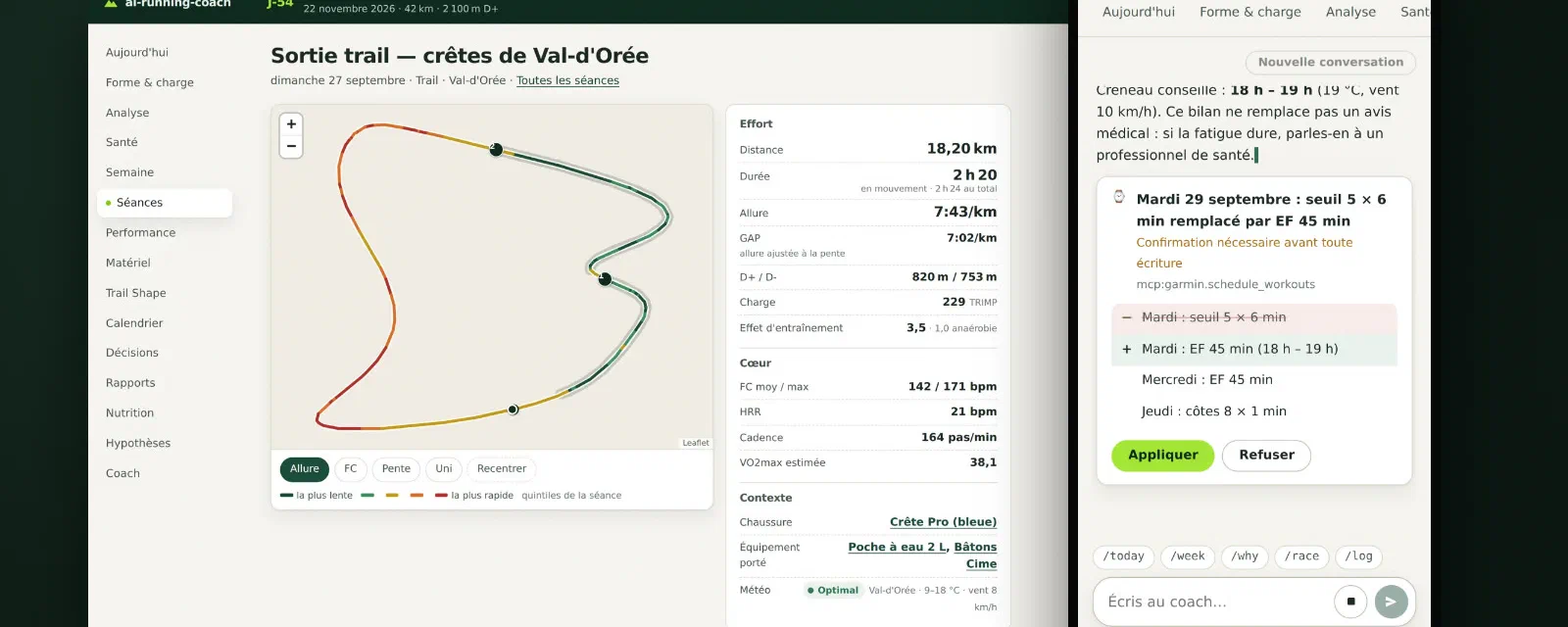
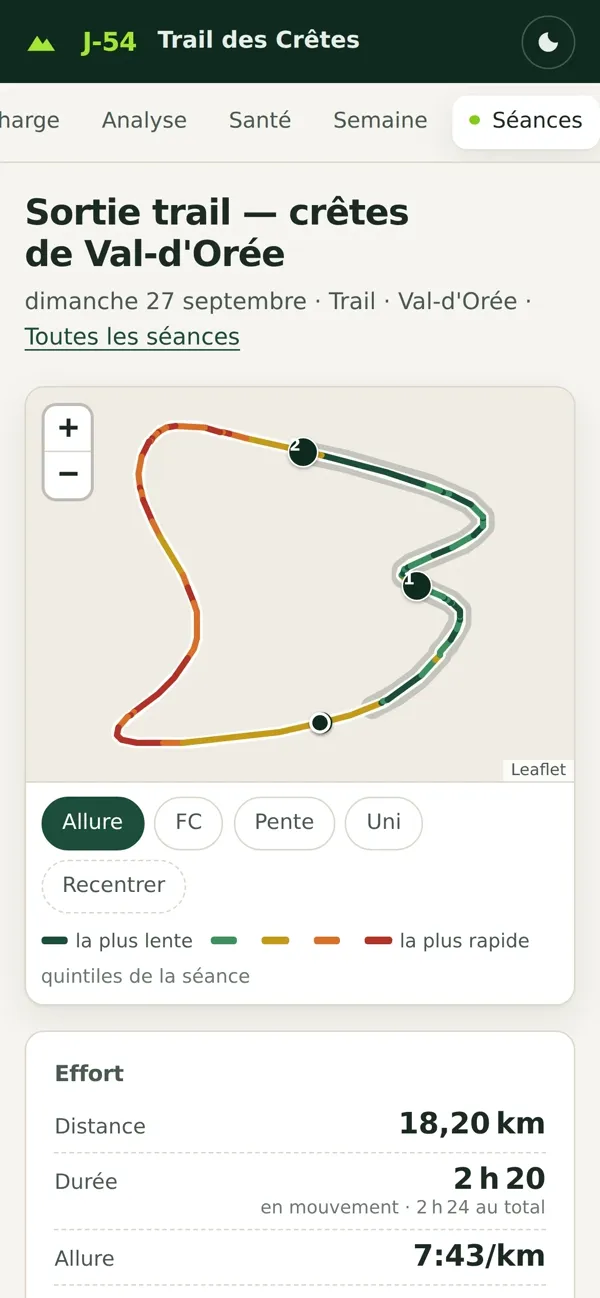
The demo session: 18.2 km and 820 m of climbing. The track is colored by pace quintile (it can also be colored by HR or slope), and the numbered markers are the detected climbs. This is the offline mode, with no background tiles.
- The map uses Leaflet (vendored into the repo, not loaded from a CDN) with OpenTopoMap tiles. The tile server is configurable in
[dashboard].map_tiles. Leave it empty for offline mode, and only that one host is added to the Content-Security-Policy. - The track can be colored by pace, HR or slope, and the climbs are highlighted.
- An altitude / HR / pace / cadence profile sits below the map and is linked to it by a shared cursor: move along the profile and the marker moves on the map.
- A new route,
/api/activity/<id>/track, is the only API that exposes coordinates. Everything else stays location-free. - The page also shows how the session felt (RPE, carbs, fluids, the pain reported that day), the running dynamics, the gear used, and the energy block described in the next section.
3. A second opinion on calories#
Garmin gives you a calorie number for every session. It is an estimate, and when your optical HR sensor goes wrong, it can be off by a lot.
The idea came from a conversation with Alexandre Auffret of Tout pour ma santé, whose podcast I’ve been following for a while. He pointed me to a different way of computing energy expenditure, one that takes more data into account. Rather than replacing Garmin’s number, I chose to keep both: the gap between the two calculations is information in itself, and it helps make better decisions. Thank you, Alexandre! 🙏 His site (in French) also has plenty of useful resources on nutrition and training, including training plans if you’re looking for one.
So PR #123 adds an independent energy model, and it was built in five steps:
- The engine (
scripts/arc_energy.py, pure functions). When running, it uses the RE3 equation (Looney, Hoogkamer & Kram, 2025), which gives metabolic power from speed and slope. When walking, it uses Minetti’s walking polynomial (2002). When stopped, it counts only the standing metabolism. It integrates sample by sample over the normalised FIT data and never bridges a gap. Validated on 7 real sessions: within ±0.6 % of the reference calculation, and 3 to 6 % above Garmin. - Indexing. A derived
activity_energytable, built for running, trail, hiking and walking. Weight is resolved at the date of the session (health file, then nutrition, then profile), and any failure is reported with an explicit reason (no_weight,no_samples…). - Race plans. The course strategist now estimates energy per section of the race course (kcal, kcal/h, cumulative), with your weight on race day plus your pack weight, and puts it next to the planned fueling.
- Dashboard. Each session shows Garmin vs model, the gap and a breakdown (flat / uphill / downhill / walking / stopped). The Analysis view tracks the gap over time:

- Personal calibration. Once there are at least 15 sessions in a road or trail bucket (over 26 weeks), the project computes the median Garmin/model ratio. The factor is capped between 0.8 and 1.2, and it is applied only to forecasts, never to past sessions.
The rule I care most about: Garmin stays the reference everywhere (nutrition, reports). The model is only a check (a gap above 15 % usually means a bad HR sensor or a session tagged with the wrong sport) and a forecasting tool for a race that hasn’t happened yet. After each session, the coach adds a line like “Energy: Garmin 1,420 · model 1,167 (−17.8 %)” and suggests plausible causes when the gap is large.

4. A gear locker: shoes, equipment, Garmin sync and photo inspections#
This is the biggest feature of the week. It came in seven PRs, one GitHub issue each.
Shoes with a real history (PR #136). In your profile, a pair can now have a starting mileage (départ 120 km, for shoes bought second-hand or used before you started the project). The coach forecasts when to retire it from the last 28 days of use, flags pairs close to their threshold, sends the threshold-crossing alert only once (identified by the session that crossed it, so a re-sync doesn’t repeat it), and suggests which pair to wear once you have two or more in rotation.
Garmin gear sync (PR #137). Garmin Connect already knows which shoes you wore. The coach now reads it with get_gear and get_activity_gear. Linking a pair to a session on Garmin (add_gear_to_activity) is a write, so it always asks for confirmation first. When your notes and Garmin disagree, what you wrote wins.
Backfilling the history (PR #146). scripts/garmin_gear_backfill.py makes one get_gear_activities call per pair to attribute your whole history to the right shoes. It’s a dry run by default: nothing changes without --apply. It’s idempotent and never counts the starting mileage twice.
Not just shoes (PR #140). A new ### Matériel (gear) section covers poles, running vests, soft flasks, headlamps, HR straps, jackets… Each item can have typed triggers: km, hours, sessions, days, weeks, months. You can group items into kits (“long trail” kit), and saying “long trail kit” after a run attributes all of them at once. Before a race, the course strategist checks the mandatory gear list against your inventory: missing, to check (only the category matches), never used in training (“nothing new on race day”) or under alert. It never invents an item.
Photo inspections (PRs #141 and #150). Every ~200 km, the coach offers (it never forces) an inspection of a pair. You take five photos: both soles flat, a side view, a rear view, the upper, and a coin or ruler for scale. You drop them in gear/photos/ or give the path, and type /inspection. The gear-inspection skill returns:
- a verdict 🟢🟡🟠🔴 explained visually (rubber and lugs, foam, heel counter, upper);
- an explicit comparison with the previous inspection of the same pair, which is the most reliable signal;
- gait hints from the wear zones (posterolateral heel → heel strike, and so on), always phrased as hints and never as a diagnosis;
- a left/right asymmetry compared with your injury history, and a handoff to the medical agent if it’s enabled;
- a career summary when a pair is retired.
The photos are renamed and never overwritten or deleted. HEIC files are reported as unsupported instead of being silently ignored.
A dedicated view (PR #148). All of this is in a new Gear (Matériel) view, with a “to do” summary at the top, and a page per item (career summary, km per month, sessions, inspections).
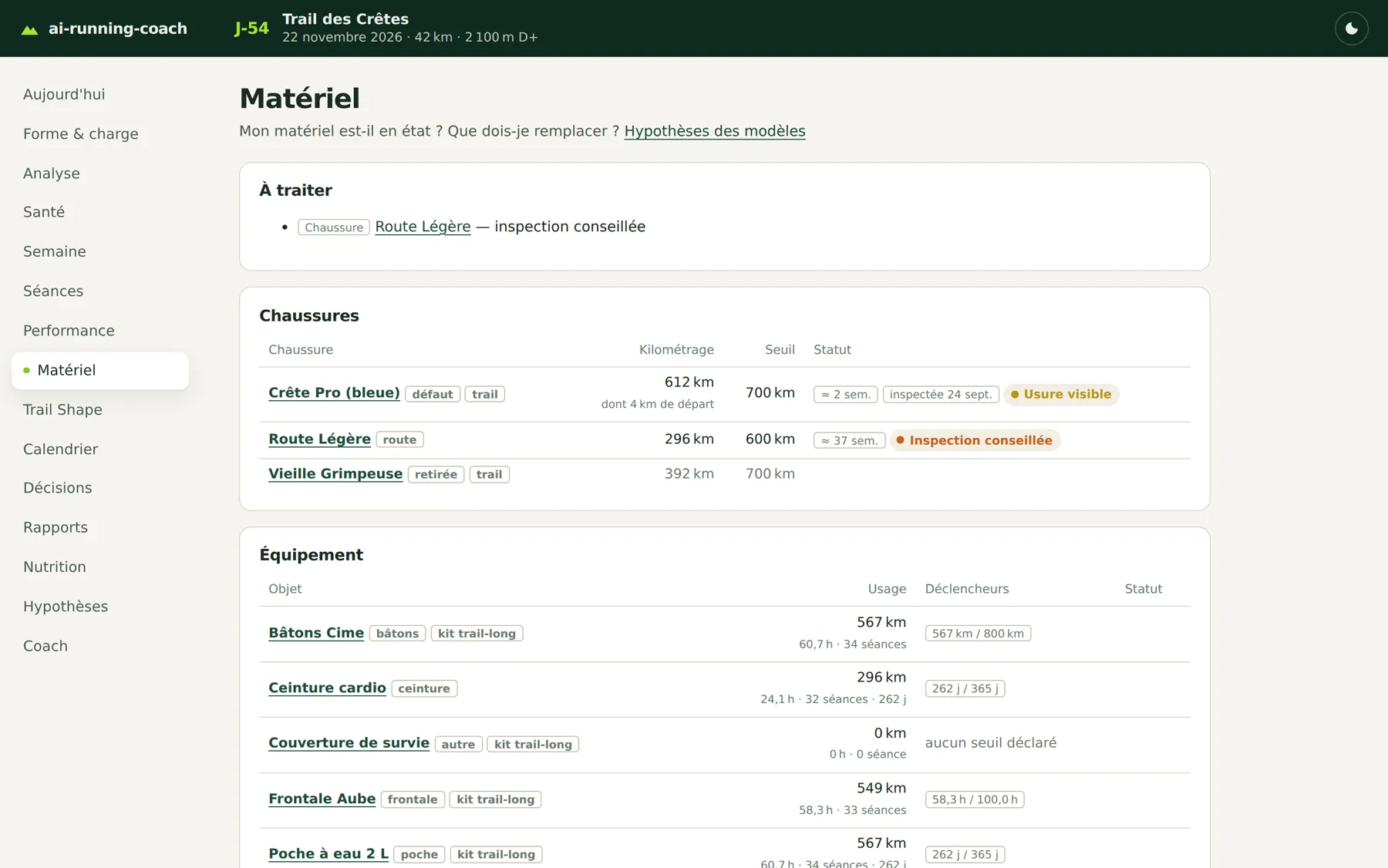
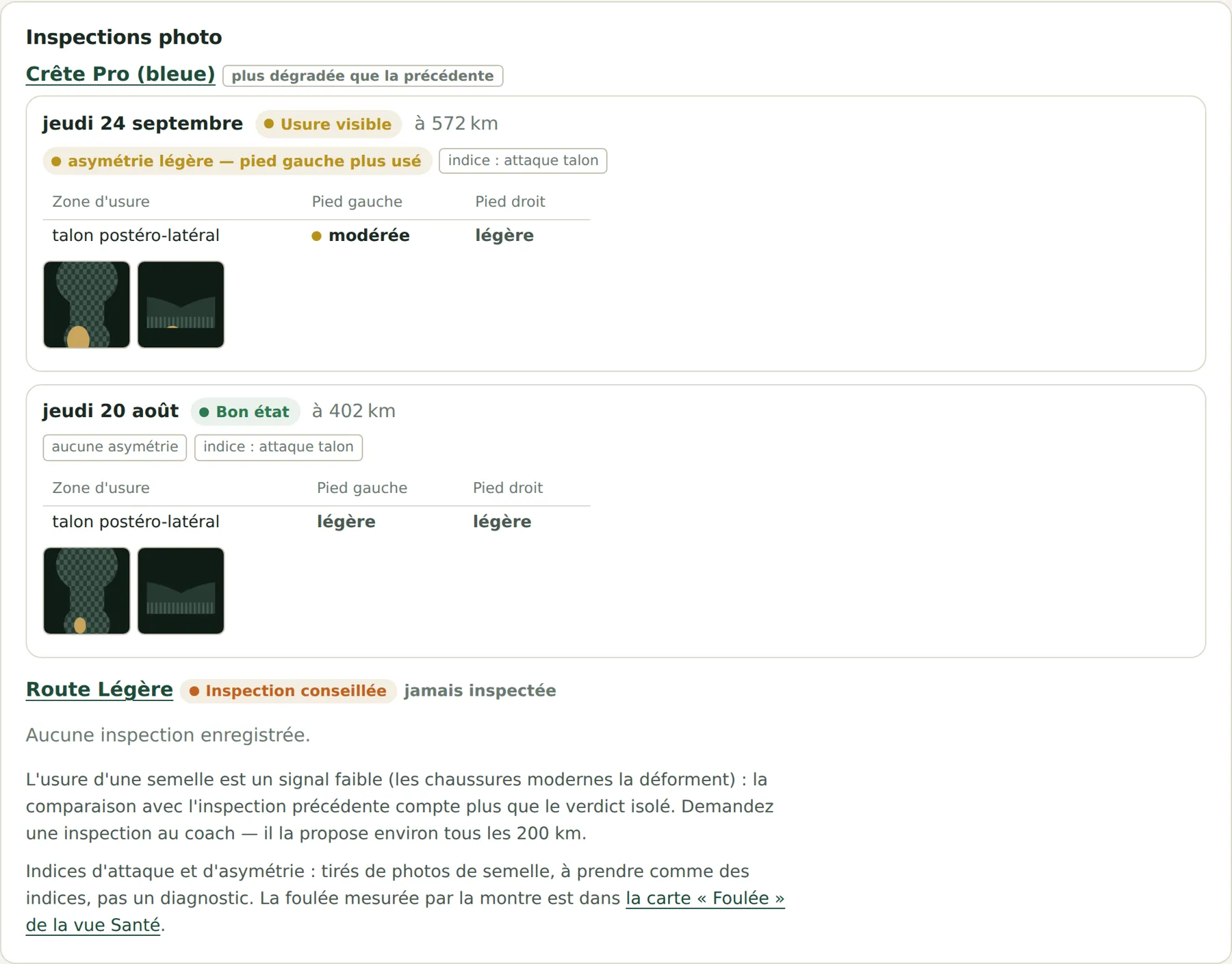
The demo workspace uses generated images, not real shoe photos.
5. Running dynamics: what the watch measures vs what the soles suggest#
If your watch or HR strap records running dynamics, the FIT files contain ground contact time, ground contact balance, vertical oscillation, vertical ratio and step length. PR #152 extracts them (with download_fit.py --refresh-dynamics to re-read your existing FIT files offline) and adds a Gait card to the Health view:

The card does one thing I like a lot: it separates what is measured from what is guessed. The photo-inspection hints are listed under the measurements, and when they disagree (“asymmetric wear, but measured balance is within 0.6 points of 50 %”), the card says so and the measurement wins. It never changes the training load or the plan.
6. Living with a long history#
After a few months, some pages were getting too long or too slow:
- The dashboard was slow on the first request (about 5 s, and again after 30 s of inactivity), because reindexing ran inside the request and every FIT metric was recomputed even when nothing had changed. PR #126 moved indexing to a background thread, added a fingerprint so unchanged passes are skipped and a per-session cache, gzip and ETags. On real data (694 files, 118 FIT files), an unchanged pass went from 5 s to 0.2 s, and a pass with changes from 8.9 s to 0.44 s, with tables identical to a full recompute.
- Sessions (PR #154): search by name or place (accent-insensitive), filters by sport and year, totals for the current filter, monthly groups with their own totals, 50 per page, and the state kept in the URL. While doing this I found that
/api/activitieswas capped at 500 and silently truncated long histories. The cap is now 10,000.

- Assumptions: the list of model assumptions at the bottom of the Performance page became its own view, with 94 assumptions grouped by model, one model at a time, global search, and contextual links from every chart (“how is this computed?”).

7. A second contributor: @rdlh#
After Giovanni last week, a second person sent pull requests: @rdlh, who uses the project with Intervals.icu as the data source. That is not my setup, and it uncovered real bugs:
- PR #142: FIT downloads from Intervals.icu. With
--source intervals, the coach can now download and analyse the FIT files too, so all the trail metrics (GAP, decoupling, VAM, durability) work without Garmin. A Strava import or a manual entry with no FIT file is reported as unavailable, not as a failure, so the unattended sync doesn’t raise false alarms. - PR #138: altitude stuck at 0.0 m. Some watches write exactly 0.0 m when the altimeter has no reading, even in the middle of a run at 800 m (it showed up on an Apple Watch synced through Intervals.icu). Each edge of those gaps produced a “climb” of several hundred metres in a few seconds (over 100,000 m/h!), which broke GAP and decoupling. Runs of 0.0 m next to a valid reading at least 20 m away are now treated as missing. A real 0 m at sea level is kept.
- PR #139: time in zone was over-counted. Each 5-second bucket counted as 5 full seconds, even around a pause or at the end of a run. Each bucket now records the seconds it actually covers.
- PR #124:
/coach-setupshowed truncated, misaligned answer labels on Python < 3.11, because the fallback TOML parser split arrays on commas, including commas inside strings.
Their pull requests all say the same thing: “code written by Claude (Claude Code), reviewed and validated by rdlh”. That is exactly how I work on this project too. Thank you! 🙏
8. Behind the scenes#
- Security review (PR #144). The unattended sync is now more locked down: Python can only run the engine’s scripts (no more
python3 -c), writing toscripts/,skills/,.claude/and.mcp.jsonis denied, and the Garmin write tools (workouts, courses) are removed from the unattended run.garmin_mcpis pinned to a commit, and two config leaks are closed (a.bakfile holding the ntfy topic, and the user config ending up in the Docker image). - Claude in CI (PRs #129 and #143). Every PR gets a Claude Code review, and
@claudecan be asked for help in comments. Both workflows are skipped for forks and non-collaborators instead of failing. - Releases (PR #162). A SemVer tag can be created on demand (patch / minor / major), a GitHub release is published automatically with generated notes, and PRs are labelled from their title prefix (
feat,fix,docs,test). - PR #125 fixed a quiet one: on the coach machine, under SSH and cron, the FIT download couldn’t find the Garmin Python environment, so the daily sync was skipping the FIT samples without saying so.
What’s next#
Two of these features change how the project fits into a day: the gear locker, which turns “are these shoes done?” into a number and a photo history, and the chat, for the moments you’re at a desk rather than on the couch with your phone. And the videos are the best answer I have to “so what does it actually do?”.
If you want to try it:
git clone https://github.com/mmornati/ai-running-coach.git
cd ai-running-coach
./install.sh # or --preset coach-server- 🎬 Videos: mmornati.github.io/ai-running-coach/videos
- 📖 Documentation: mmornati.github.io/ai-running-coach
- 💻 GitHub: github.com/mmornati/ai-running-coach
Issues, ideas and pull requests are welcome. Two people have already shown how! And as always: this is a tool to help you prepare. It does not replace a medical opinion.