

On September 19 I published Preparing an Ultra-Trail with ai-running-coach. That post told the story of the Ultra 110 km Trail Côte d’Opale and how a set of AI agents, working in markdown files, helped me get to the finish line.
That was nine days ago, and the project has changed a lot since then. Between September 19 and September 27, the repository went from PR #1 to PR #122. That means a web dashboard, around twenty new metrics, a rules engine that can veto the coach, commands built for the phone, a second data source, and the first outside contributions. The documentation was rewritten along the way, and all the screenshots in this post come from it. They are real captures of my own workspace, three days before the race.
Here is a tour of what changed and, more importantly, what each change is for.
1. A dashboard: seeing what the coach knows#
The first version had one real limitation. Everything lived in markdown files. That is great for versioning and for the agents, but less great when you just want to know “am I running today?” at 6:30 in the morning.
So I added a local, read-only dashboard (docs). It is a small server built on the Python standard library plus one HTML/CSS/JS page. There is no npm and no build step. You start it with scripts/dashboard.sh, and it opens http://127.0.0.1:8765/.

The “Today” view on September 10, three days before the race. It shows the coach’s last verdict, the morning check (overnight HRV, resting HR, sleep debt, readiness, sleep) placed against my own baselines, the planned session with its weather window, and the form summary.
To make this possible, every file the agents write now starts with a small ```arc JSON block: a data contract with English keys and SI units, where a missing measurement is simply left out. A SQLite index is derived from those blocks. It is disposable, rebuilt from the files, and refreshed within 30 seconds whenever an agent writes something. The markdown stays the source of truth, and the dashboard only formats it.
Each view answers one question:
| View | The question it answers |
|---|---|
| Today | Do I run, go easy, or rest? |
| Form & load | Where is my fitness heading? |
| Analysis | Are my technique and durability improving? |
| Health | How is my body coping? |
| Week | What was planned, what was done? |
| Sessions | How did it go? (splits, HR, coach analysis) |
| Performance | What can I aim for? |
| Trail Shape | Am I ready for my goal? |
| Decisions | Why did this session change? |
| Calendar / Reports / Nutrition | Consistency, the coach’s conclusions, fueling |

Form & load over six months. Condition (42 days), fatigue (7 days) and form, the acute/chronic ratio against its 0.8-1.3 reference band, and weekly hours with cumulative elevation.

The Health view. The HRV chart shows two references: Garmin’s band on the raw night value, and my own baseline on the 7-day average. Below it, a strip shows the coach’s verdict for each day (maintain / ease off / rest).

The race week: the plan next to what was done, day by day, with the weather category and a compliance summary.
A few practical details I care about:
- It works at phone width and has a dark theme.
- It can run on a remote machine and be reached through an SSH tunnel, or sit in a Docker container behind a reverse proxy with single sign-on (Traefik + Authentik/Authelia).
- The metric names are generic (condition / fatigue / form instead of CTL/ATL/TSB), and a trademarks and metrics page lists the published formula behind every model. The project is independent and not affiliated with Garmin or TrainingPeaks, so I wanted this to be clean.
2. Metrics that actually speak “trail”#
The second big block of work was FIT ingestion. After each sync, the coach downloads the raw FIT file of every new running/trail session. It normalises the file (5-second samples, never versioned, rebuildable at any time) and computes metrics you usually only get from paid platforms:
- HR zones, time in zone and 80/20 polarisation (Seiler’s three-zone model), using the zone method you picked (Karvonen, % of LTHR, or % of max HR).
- Grade-adjusted pace (GAP), based on the Minetti energy-cost model.
- Aerobic decoupling and efficiency factor: how much your HR drifts relative to pace between the two halves of a run.
- VAM on automatically detected climbs, and descent efficiency per slope class.
- Durability: how much your GAP fades over long runs, which is the metric that matters for an ultra.
- Progress on the same climb: every time you run a known segment, it is matched and compared.
The FIT files cover the session itself. The workspace data covers the rest:
- Plan compliance: sessions, duration and elevation done compared with what was planned.
- Personal HRV baseline (7-day average of ln(HRV) vs 60 days ± 0.5 SD), on top of Garmin’s band.
- ITRA effort-km (distance + elevation/100) for comparing trail weeks.
- Weight trend and sleep debt.
- Heat acclimation (hot sessions ≥ 25 °C over 14 days).
- Shoe mileage.
- Carbs per hour and sweat rate on long runs.
The session detail page shows the splits chart with pace and HR per lap. Here is the ultra itself:

110 splits, 15h26 of racing. The HR line stays between 110 and 140 bpm for the whole day, and the pace bars show the walking sections on the climbs and the last kilometres of dunes.
3. Guardrails: a coach that can say “no”#
The most common complaint about AI coaches is a progression that is too aggressive, and there have been injury reports with similar tools. An LLM is good at reasoning about your week. It is not a reliable calculator of your acute/chronic load ratio.
So there is now a deterministic rules engine (docs). It is pure Python and fully tested, and the coach must consult it before writing a week and before pushing sessions to the Garmin calendar. It has seven rules:
| Rule | What it checks |
|---|---|
| R1 | Projected ACWR over the proposed week |
| R2 | Jump in weekly volume |
| R3 | Jump in weekly elevation (trail) |
| R4 | Projected Foster monotony |
| R5 | A quality session the day of or after a red health verdict (blocking) |
| R6 | Share of the long run in the weekly volume |
| R7 | Two quality sessions on consecutive days |
The engine also knows when not to apply itself: not enough history, race week, a week with too few sessions. It is a second opinion, not a gatekeeper that blocks everything. All thresholds can be configured, and the docs explain the scientific caveats (ACWR is warn, not block, by default).
The second part is about explainability. Every time the coach changes a session (morning check, guardrail, injury, weather, or my own request), it writes a decision file with the trigger, the inputs that justified it, and the before/after. From that:
- the dashboard shows a “Why today?” box and a filterable Decisions log;
- the
/whycommand explains the latest decision, quoting the log and never inventing a reason; - the push notification’s 5th line turns into
Pourquoi :(“Why:”) when something was adjusted.
There is also a composite injury-risk flag. It is raised when several indicators drift together, and it follows reported pain up to a recommendation to see a doctor.
4. From training to race day, and back#
Several features cover the part of the preparation I did by hand for the ultra:
- A personal slope → pace model, learned from your own sessions.
- Segment-by-segment race pacing: the course strategist cuts the GPX into segments and predicts each one with your model. For ultras it uses piecewise Riegel and an additive fade beyond 6 hours.
- Personal targets in each session (zones, GAP, climb elevation) instead of generic paces.
- Multi-week plans, shown week by week in the dashboard.
- Trail Shape, a 0-100 score that compares the last 8 weeks with what the goal race demands.
- Race debrief: planned vs actual per segment, pace gap and cumulative drift, fade, carbs per hour, weather.
- ITRA and UTMB performance indices, with their history.

Trail Shape at D-3: 75/100. Weekly effort-km at 70 % of target, longest run (38.5 km) at 64 %, max elevation in one session well above target. The durability component is excluded because no long run was eligible in the window, and its weight is redistributed. It is an indicator, never a verdict: a good taper can lower the score, and the page says so.
I would have loved to have that debrief the day after the race. Now it is one command away.
5. Easier to install, easier to live with#
- Configurable document language: the project is still French by default, but you can switch.
- A configurable coach: pick your staff (keep the medical agent or not), your sport (trail/road), a coaching style and its firmness, and the level of the morning health check (
full,minimal,off). /coach-setup: an onboarding interview that pre-fills max HR, resting HR, threshold and VO2max from Garmin, each with its source, for you to confirm.- Install presets:
./install.sh --preset laptop | coach-server | docker. - A private workspace separate from the engine (
--workspace ~/my-workspace), optionally auto-committed and pushed after each sync. /coach-doctor: a one-command diagnosis (Garmin token age, MCP reachability, config, profile, index freshness, sync schedule, notifications).- A push alert before Garmin tokens expire (D-14, then D-3), with the renewal command.
- Intervals.icu as primary data source (
--source intervals), with a documented tool-by-tool mapping. What Intervals.icu can’t provide (Garmin readiness, FIT downloads, HRR) is stated as unavailable, never simulated. - An update guide for the engine, the workspace and the coach machine.
Behind the scenes, most of the effort went into tests: synthetic FIT samples, a scriptable stub MCP server, golden tests for the dashboard API, scheduled LLM evaluations, and a check that the docs don’t drift from the code. An agent that writes your training plan deserves the same rigour as any other piece of software.
6. First contributions from the community#
This is the part that made me happiest. A few days after the first post, Giovanni Clément (@gclem) sent the first external pull requests:
- GitHub Copilot support (agents, skills, MCP, instructions): the project now also runs in Copilot CLI, Copilot in VS Code and the Copilot coding agent.
- The morning check: HRV + resting HR (via a new
get_rhr_daytool) + readiness before any session decision. This became the foundation of the Today view and the health verdicts. He also followed up with a fix so resting HR is used as a filter and not as a load metric. - A fix for
install.sh --dry-run, which stopped at the first step, and line-ending normalisation with.gitattributes.
Thank you, Giovanni! 🙏
7. The coach in my pocket: Claude Code Remote Control on a Linux box#
This is how I actually use the project every day now, and it deserves some detail (docs).
The constraint: keep the subscription#
I wanted to talk to the coach from my phone, but without paying per token through an API key. A home-made mobile front (Telegram bot, PWA, Agent SDK app…) can’t use a Claude Pro/Max subscription. Anthropic blocks subscription authentication for third-party tools. The only route is to use the official remote surfaces.
The setup: a “coach machine” at home#
I have an always-on Linux machine at home. It hosts:
- the engine and my private workspace (a git repo);
- the Garmin tokens and the
garmin-mcpserver; - Claude Code, logged in with my claude.ai account (no API key);
claude remote-control, installed as a systemd user service (./install.sh --remote-control, withloginctl enable-lingerso it survives SSH logout);- the dashboard, so I can check it from anywhere.
From my phone, I open the Claude app → Code tab, and the “AI Running Coach” session is there. It runs on the Linux box, with the coach agent, the skills, the Garmin MCP server and my files. Tool confirmations (for example pushing a session to the Garmin calendar) show up on the phone. The service starts in acceptEdits mode, so markdown writes are automatic while Garmin write tools still ask me first.
What I type from the phone is mostly short:
/today
/why
/week
/race
/log 2 gels + 500 ml at km 15, left knee 3/10, RPE 7
"Move Thursday's session to Friday and push it to Garmin"
The five short commands were designed for the phone: one question, one answer. /log is the one I use most right after a run. The model extracts the entities, and a deterministic script does the arithmetic (carbs from my product catalogue, fluid conversions) and merges the result into the day’s files. Unknown product? It asks, and never guesses a nutritional value. Pain ≥ 7/10? It recommends seeing a doctor.
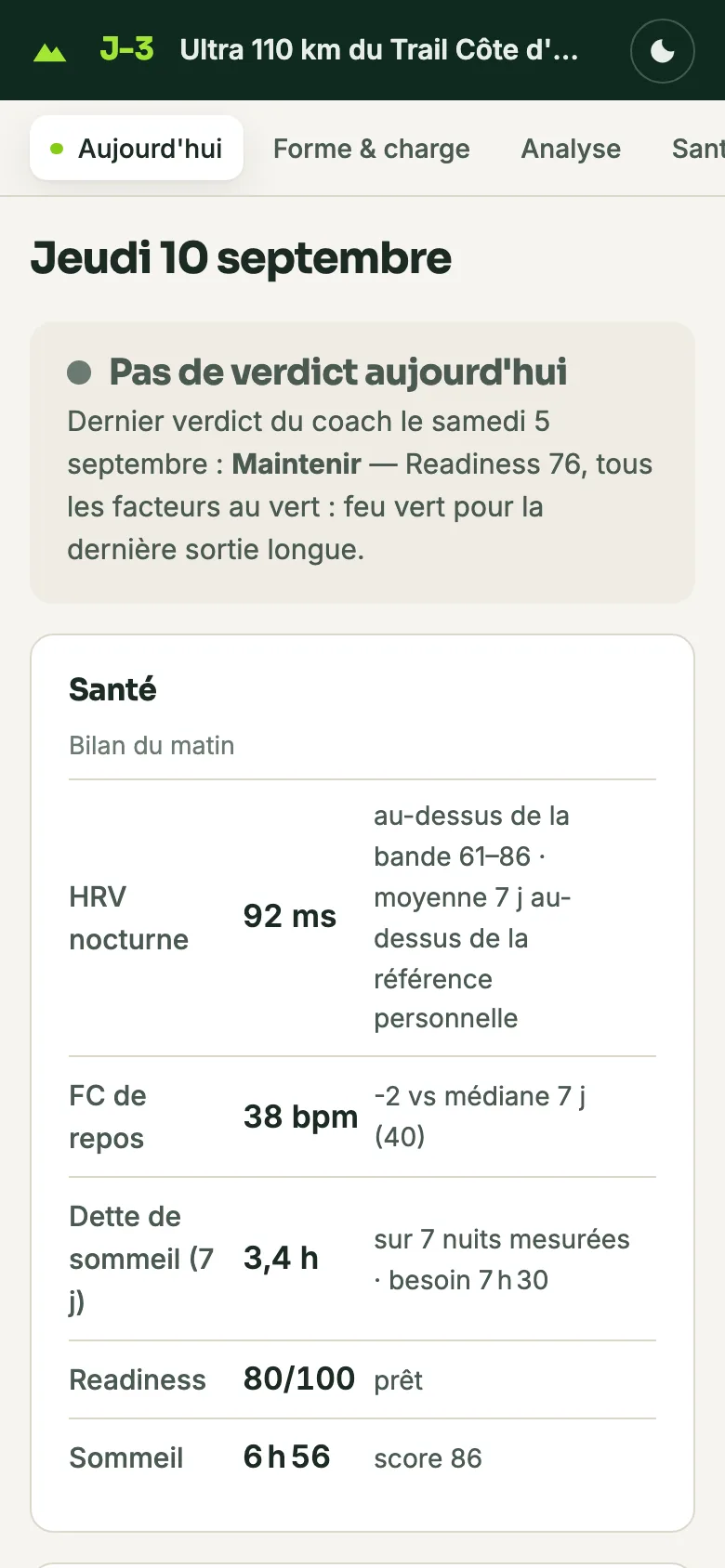
The same Today view, on the phone.
Automatic sync: why a cron and not a Claude routine?#
The other half is the automatic sync. Every morning, before I even open the app, Garmin data (night, HRV, readiness, the previous day’s session) should already be written to the workspace, with a 5-line summary pushed to my phone through ntfy:
🏃 Sync Garmin
Séances : 1 nouvelle — trail 12,3 km / 480 m D+ / FC moy 148 / HRR 28 bpm
Sommeil : 7 h 42, score 81
HRV : 62 ms — équilibré (baseline 58-66)
Readiness : 74
Alerte : aucune
(Yes, my coach writes in French: it’s the project’s default document language, and you can change it.)
The obvious question: Claude Code has scheduling features, so why use cron? I checked the current documentation before writing this, to be sure the answer still holds:
| Option | Where it runs | Why it doesn’t fit a headless Linux coach machine |
|---|---|---|
Cloud routines (/schedule) | Anthropic’s cloud, on a fresh clone of the repo | No access to local files, so no local garmin-mcp, no ~/.garminconnect tokens. Minimum interval of one hour, and a daily run cap. |
| Desktop scheduled tasks | Your machine | Only fire while the desktop app is open and the computer is awake. The Linux desktop app is a GUI beta, which doesn’t fit a box with no screen. |
/loop and in-session cron | Inside an open session | Session-scoped: they stop when the session ends, and recurring tasks expire after 7 days. |
| Self-hosted environments | Your own runners | Public beta on Team and Enterprise plans only, not on Pro/Max. |
The documentation itself points the other way: to run Claude Code on your own always-on machine and drive it from other devices, use Remote Control, which is exactly the interactive half of my setup. For the unattended half, the most reliable trigger on a machine with no screen is still the system’s own cron, calling the official CLI in headless mode:
./install.sh --daily-sync          # installs the cron entry
# which ends up running, twice a day by default (07:15 and 14:15):
scripts/daily-sync.sh              # → claude -p "/garmin-daily-sync"
claude -p uses the same subscription login as the interactive sessions. The script also pulls the workspace repo before running and commits/pushes after, so the laptop and the coach machine stay in sync. It handles a lock, the notification and the logs. You can swap in codex exec as the runner if you prefer.
The “watch” mode: only pay the LLM when Garmin has news#
Fixed times have one flaw: on Saturday I wake up late, or I run in the evening, and the 07:15 sync finds nothing new. Garmin doesn’t offer webhooks to individuals (its developer program is for companies), so the newest addition (PR #121, merged yesterday) is a watcher. scripts/garmin_watch.py runs from cron every 15 minutes without any LLM:
- One API call asks for the time of the watch’s last upload. Unchanged? It stops there, costing zero tokens.
- New upload? It checks whether the workspace is missing that activity or today’s sleep file. It keeps checking for 90 minutes, because Garmin computes the sleep score a few minutes after the upload.
- Something new? It waits 10 minutes for things to settle and then runs
daily-sync.sh. There are at least 30 minutes between runs, at most 6 runs per day, exponential backoff on HTTP 429, and a fallback full run at 21:30 if nothing ran that day.
# config/workspace.user.toml
[sync]
mode = "watch"
So the LLM only runs when there is actually something to do, a few minutes after I stop my watch. By the time I’ve had a shower, the notification is on my phone, the dashboard is up to date, and I can ask “how was it?” from the couch.
What’s next#
The ultra is behind me, and recovery was tracked day by day. The next goals will be prepared with all of this from day one: a Trail Shape score to follow, a real debrief afterwards, and a coach I can reach from anywhere.
If you want to try it:
git clone https://github.com/mmornati/ai-running-coach.git
cd ai-running-coach
./install.sh # or --preset coach-server- 📖 Documentation: mmornati.github.io/ai-running-coach
- 💻 GitHub: github.com/mmornati/ai-running-coach
Issues, ideas and pull requests are welcome. Giovanni has shown the way! And as always: this is a tool to help you prepare. It does not replace a medical opinion.