# Build RPMs using Jenkins/Hudson
A continuous integration system, like Jenkins, that is not created for project "outside java world", can be used today for many build activities. You can, for example, find plugin for iOS project CI build, android platform, python project, ...
Here I'll shown a way to use it to build RPMs in CI.
First think, for simplicity in Jenkins build script, I suggest you to use a Makefile for your project. Following an example created for the OpenSymbolic and Kermit projects.
TOPDIR = $(shell pwd)
DATE="date +%Y%m%d"
PROGRAMNAME=kermit-webui
RELEASE=0.0.3
TMPDIR=/tmp
BUILDDIR=build

all: rpms

manpage:

messages:

bumprelease:

#setversion:

build: clean
	echo $(TOPDIR)
	echo "- Create Changelog file"
	git shortlog > changelog.txt
	echo "- Create new $(TMPDIR)/$(BUILDDIR)"
	mkdir -p $(TMPDIR)/$(BUILDDIR)
	mkdir -p $(TMPDIR)/$(BUILDDIR)/$(PROGRAMNAME)
	echo "- Copy existing Kermit sources"
	rsync -raC --exclude .git . $(TMPDIR)/$(BUILDDIR)/$(PROGRAMNAME)
	echo "- Remove useless files"
	rm -Rf $(TMPDIR)/$(BUILDDIR)/$(PROGRAMNAME)/src/sqlite.db
#	echo "- Rename $(PROGRAMNAME) in $(PROGRAMNAME)-$(RELEASE)"
#	mv $(TMPDIR)/$(BUILDDIR)/$(PROGRAMNAME) $(TMPDIR)/$(BUILDDIR)/$(PROGRAMNAME)-$(RELEASE)
	echo "- Compressing $(PROGRAMNAME) directory"
	tar -czf $(PROGRAMNAME)-$(RELEASE).tar.gz -C $(TMPDIR)/$(BUILDDIR) $(PROGRAMNAME)/
	echo "- Moving source package in dist dir"
	mkdir -p ./dist
	mv $(PROGRAMNAME)-$(RELEASE).tar.gz ./dist

clean:
	-rm -rf dist/
	-rm -rf rpm-build/
	-rm -rf $(TMPDIR)/$(BUILDDIR)

clean_hard:

clean_harder:

clean_hardest: clean_rpms

install: build manpage

install_hard: clean_hard install

install_harder: clean_harder install

install_hardest: clean_harder clean_rpms rpms install_rpm restart

install_rpm:

restart:

recombuild: install_harder restart

clean_rpms:
	-rpm -e kermit-webui

sdist: messages

new-rpms: bumprelease rpms

pychecker:

pyflakes:

money: clean

async: install
	/sbin/service httpd restart

testit: clean

unittest:

rpms: build manpage sdist
	mkdir -p rpm-build
	cp dist/*.gz rpm-build/
	rpmbuild --define "_topdir %(pwd)/rpm-build"
	--define "_builddir %{_topdir}"
	--define "_rpmdir %{_topdir}"
	--define "_srcrpmdir %{_topdir}"
	--define '_rpmfilename %%{NAME}-%%{VERSION}-%%{RELEASE}.%%{ARCH}.rpm'
	--define "_specdir %{_topdir}"
	--define "_sourcedir  %{_topdir}"
	--define "vendor Think"
	-ba misc/specs/kermit-webui.spec
The important part is the one inside build where we create the source .tgz file (with the correct name) to use later, in the rpms part of the makefile, to create the RPM. There are different way to create it and, maybe, this one is not the best you can create; later we will a see a different way to configure it without using the makefile and downloading sources from Github.
After the Makefile creation you can try to compile your project simply running make command in the folder where you have created the Makefile (usually the project root folder).
Now we can configure a new project inside Jenkins, that should be a **free style project** with a build step with **execute shell** configuration.
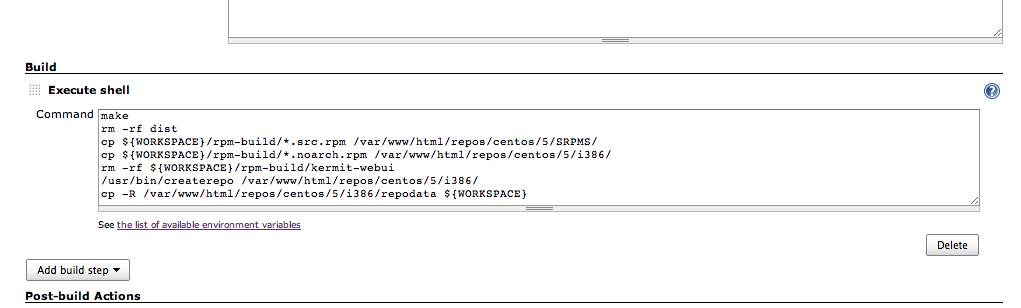 You can just put *make* and Jenkins will build the project. Here we have an example that will get created RPM and will update a local yum repository that will be uploaded on a server using ftp at the end of build step.
 Now you have a Jenkins that will build a new RPM after any commit (or once a day, depending on your build configuration) and upload the new RPM on an online repository. Easy and working :)
 Now you have a Jenkins that will build a new RPM after any commit (or once a day, depending on your build configuration) and upload the new RPM on an online repository. Easy and working :)