# Docker: how to manage a multi site webserver
Since its first version I'm a fanatic of [Docker](https://www.docker.com/): I'm a developer, I was an Ops and I don't want to dirty a server with plenty of different packages/service that will require update and maintenance.
The important thing from docker is that you can separate the service/server from your personal files or code: you can update your code without changing the service or vice versa. And most important, if your server will have problem, you will be able to start up everything on a new server in a couple of minutes: download all the docker containers, restore your *custom code* and start all up.
With this post I just want to share how easy can be to manage a multi site server simply using docker containers.
What you I'm going to show you is how I setup my personal webserver (the one hosting this blog).
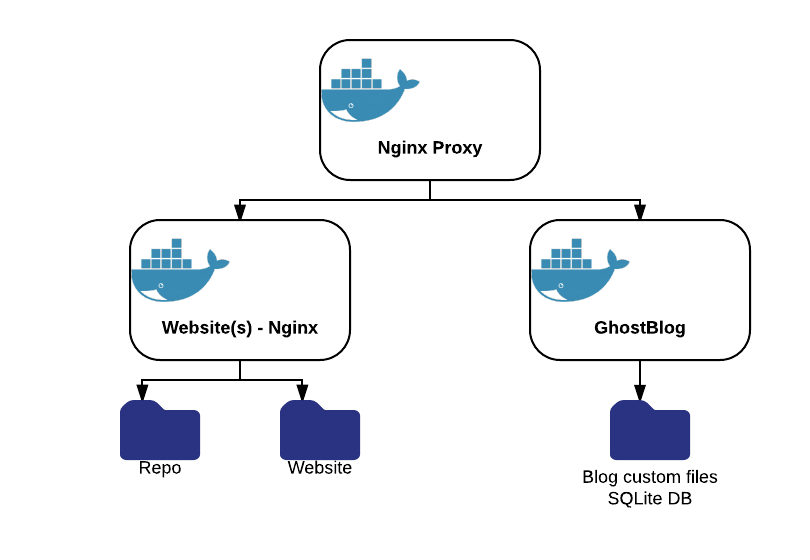
All my Website is based on 2 docker images (3 in reality... but, you will see):
* [Nginx Proxy](https://github.com/jwilder/nginx-proxy): is a really incredible **automatic Docker proxy**. It is able to discover new services based on virtual host and port and expose them automatically. You start your *web* docker, it exposes it :)
* [Docker GhostBlog](https://github.com/mmornati/docker-ghostblog): is a Docker container I created to [simplify the installation](https://blog.mornati.net/ghost-blog-update-made-easy-using-a-docker-container-2/) for any new Ghost version.
* Nginx Server: is the base image for the proxy and, used directly, allow to expose static pages.
What I just need to do is: pull these *2* dockers, copy my static files and db backups, start them up and enjoy.
If I want to add a new (test) service I'm working on? Put it in a docker, start it up and Nginx Proxy will expose it.
Following all my (partially masked) startup commands:
* Start the Nginx Proxy, configured for HTTPS too:
docker run -d --name nginx -p 80:80 -p 443:443 -v /opt/nginx/certs:/etc/nginx/certs -v /var/run/docker.sock:/tmp/docker.sock:ro mmornati/nginx-proxy
* Start the Nginx WebServer. Into the following command you can see the **VIRTUAL_HOST** environment variable, which is the one used by the Nginx Proxy to know how to expose this container.
In this example all the requests coming to **mornati.net**, **www.mornati.net**, **repo.mornati.net** will be redirected from the proxy to this container.
Inside the `/opt/nginx/conf.d` folder there is the nginx configuration to answer to these virtual hosts (folders with the static contents to provide)
docker run -d -p 127.0.0.1:8080:80 --name web -e VIRTUAL_HOST=mornati.net,www.mornati.net,repo.mornati.net -v /opt/nginx/conf.d:/etc/nginx/conf.d -v /opt/nginx/www:/var/www/html -t nginx:1.9.5
* Start the Ghost blog container.
The **WEB_URL**, **SERVER_HOST** and **SERVER_PORT** variables are used by the ghost container, the **VIRTUAL_HOST** by the Nginx Proxy.
docker run -d --name blog -p 127.0.0.1:2368:2368 -e WEB_URL=http://blog.mornati.net -e SERVER_HOST=0.0.0.0 -e SERVER_PORT=2368 -e VIRTUAL_HOST=blog.mornati.net -e CLOUDINARY_URL=cloudinary://xxxx@blog-mornati-net -v /opt/ghost-blog:/ghost-override mmornati/docker-ghostblog:0.10.0
With these 3 commands (in this order: the proxy should be start before the others to allow the auto detection of new services) all my "websites" will be put online.
I can update services, rollback in case of errors, test new webapps without creating a (long) out of services.