
Overview#
The Ghost Blog Platform, which I’m using for this blog, is still a sort of beta code. It contains today plenty of new functions and you can start do everything you like (or at least everything that should be done into a blog); it is OpenSource based on NodeJS and you can easily extend it, create themes, …
The Problem#
This beta status is still impacting the update process:
- you have to check the changelog (to imagine if anything could be broken)
- you have to download the source code
- follow the update procedure (it is always the same, but you never know)
- copy the new code to your server
- back up the content folder (just to be sure you won’t lose anything)
- restart everything (NodeJS server)
And… if nothing works… rollback following the same procedure bottom up.
This means you need every time at least 15 minutes when all is good… or lose a couple of hours if you need to fix things.
Docker Solution#
Using the docker container base concept: a container is immutable we can automate all this procedure. This will reduce the manual actions and, in case of rollback, you can simply restart the previous container where you still have your old ghost version.
You can find what I’m using for this blog on my GitHub repository.
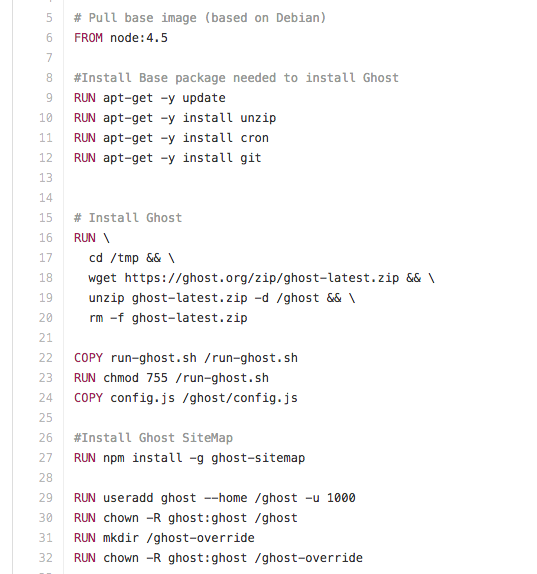
As you can see into the Dockerfile, based on the NodeJS 4.5 LTS, we are always downloading the latest version of Ghost, uses dynamic configuration with some environment variables and doing some cool stuff that I let you discover reading the Dockerfile :)
The Ghost content folder is outside your docker container, mounted as external volume; so it is not necessary to backup it during the procedure (even if I suggested because you never know) and, especially, you can start a new docker to test if all is good without putting your blog offline. If all is ok for you, you can then shut down the previous Docker container and restart the new one: your blog will be offline for less than a minute.
Usage#
I let you discover everything, completing with just some examples this blog post:
Build the GhostBlog container
git clone https://github.com/mmornati/docker-ghostblog.git
cd docker-ghostblog
docker build -t mmornati/docker-ghostblog:0.10.0 .
Start the built container
docker run -d --name blog -p 80:2368 -e WEB_URL=http://blog.mornati.net -e SERVER_HOST=0.0.0.0 -e SERVER_PORT=2368 -e CLOUDINARY_URL=cloudinary://11111:aaaaaa_bbbb@blog-mornati-net -v /opt/ghost-blog-content:/ghost-override mmornati/docker-ghostblog:0.10.0Check if all is good
docker ps
Access to your container
http://localhostDownload my prebuilt containers
I’m using the DockerHub automatic build function: any time I’m changing things on github, DockerHub is creating a new version of the container.
All is available online, so you can simply run a docker pull to retrieve the latest version (or a specific one).
docker pull mmornati/docker-ghostblog