
Today I’ll show you a simple script to improve your home’s energy efficiency by regulating internal temperature based on external values.
This is the first simple version based on a single temperature point. I have a newer version ready to test, but I need to wait for hotter days 😅
What do you need for this?
* Automatic / Home Assistant controller Covers
* One (or more) temperature sensors
* and for sure, one or more windows exposed to the sunlight 😉
The Trigger#
As with the presence simulation script, I use a time_pattern trigger because I want to constantly recheck conditions during a specific timeframe.
An alternative to reduce executions is a multi-trigger: when any trigger is validated, the automation starts. I’ll cover this at the end.
trigger:
  - platform: time_pattern
    minutes: "/5"
The automation runs every 5 minutes.
The Conditions#
Here are the conditions to ensure we close at the right time.
condition:
    - condition: time
      alias: "Time 13~20"
      after: "12:30:00"
      before: "18:00:00"
    - condition: or
      conditions:
        - condition: template
          # If automation was never triggered
          value_template: "{{ states.automation.close_cover_based_on_afternoon_temperature.attributes.last_triggered == none }}"
        - condition: template
          # If automation not played in the last 8 hours (means played only the day before)
          value_template: "{{ ( as_timestamp(now()) - as_timestamp(state_attr('automation.close_cover_based_on_afternoon_temperature', 'last_triggered')) |int(0)) > 28800 }}"
    - condition: template
      value_template: "{{ states.sensor.netatmo_maison_willems_indoor_namodule1_temperature.state|float > states.sensor.capteur_mouvement_salon_temperature.state|float + 2 }}"
    - condition: numeric_state
      entity_id: sensor.capteur_mouvement_salon_temperature
      above: 20
Time
The covers I want to control face south, so I only run the automation during the afternoon when the sun is directly facing the windows: after: "12:30:00" before: "18:00:00"
Not executed already
- condition: or
      conditions:
        - condition: template
          # If automation was never triggered
          value_template: "{{ states.automation.close_cover_based_on_afternoon_temperature.attributes.last_triggered == none }}"
        - condition: template
          # If automation not played in the last 8 hours (means played only the day before)
          value_template: "{{ ( as_timestamp(now()) - as_timestamp(state_attr('automation.close_cover_based_on_afternoon_temperature', 'last_triggered')) |int(0)) > 28800 }}"
This part — which I know seems complex — checks if the automation already fired (up to this execution) or was never executed (needed for the first run or when the last run was so long ago that historical data was removed).
We use the last_triggered property, checking if it’s none or if the last execution was more than 8 hours ago. Why 8 hours? It just needs to prevent re-execution in the same timeframe (12:30-18:00) while allowing it the next day (18:00-12:30). 8 covers both: greater than 6.5 hours (18:00-12:30) and less than 18.5 hours (12:30-18:00).
Temperature
    - condition: template
      value_template: "{{ states.sensor.netatmo_maison_willems_indoor_namodule1_temperature.state|float > states.sensor.capteur_mouvement_salon_temperature.state|float + 2 }}"
    - condition: numeric_state
      entity_id: sensor.capteur_mouvement_salon_temperature
      above: 20
The other two conditions check internal and external temperature.
The second condition checks the temperature in the room with the covers — it must be above 20°C.
The next condition checks the difference: external must be at least 2°C warmer than internal.
* states.sensor.netatmo_maison_willems_indoor_namodule1_temperature.state|float external module
* states.sensor.capteur_movement_salon_temperature.state|float + 2 internal module + 2 degrees.
The Action#
If all conditions are met, the covers close.
  action:
    - service: cover.set_cover_position
      data:
        entity_id:
          - cover.salon_n1_6
          - cover.salon_n2
          - cover.salon_n3_12
          - cover.salon_n4_14
          - cover.chambre_jardin_3
        position: 40
All the covers I want to control are placed at 40%. Not fully closed, but enough to reduce sunlight entering the room.
I added another cover from a different room without creating a separate action — the exposure is the same.
If we put it all together the script is the following:
- id: cover_closes_weather
  alias: "Close cover based on afternoon temperature"
  trigger:
    - platform: time_pattern
      minutes: "/5"
  condition:
    - condition: time
      alias: "Time 13~20"
      after: "12:30:00"
      before: "18:00:00"
    - condition: or
      conditions:
        - condition: template
          # If automation was never triggered
          value_template: "{{ states.automation.close_cover_based_on_afternoon_temperature.attributes.last_triggered == none }}"
        - condition: template
          # If automation not played in the last 8 hours (means played only the day before)
          value_template: "{{ ( as_timestamp(now()) - as_timestamp(state_attr('automation.close_cover_based_on_afternoon_temperature', 'last_triggered')) |int(0)) > 28800 }}"
    - condition: template
      value_template: "{{ states.sensor.netatmo_maison_willems_indoor_namodule1_temperature.state|float > states.sensor.capteur_mouvement_salon_temperature.state|float + 2 }}"
    - condition: numeric_state
      entity_id: sensor.capteur_mouvement_salon_temperature
      above: 20
  action:
    - service: cover.set_cover_position
      data:
        entity_id:
          - cover.salon_n1_6
          - cover.salon_n2
          - cover.salon_n3_12
          - cover.salon_n4_14
          - cover.chambre_jardin_3
        position: 40
I’ve been using this for 2 years and it makes a big difference in how the temperature feels. It’s a game changer for me.
Different triggers to reduce the number of execution#
As I said earlier, we can use a different trigger instead of time_pattern to reduce executions. Even without firing the action, checking conditions uses some CPU.
Looking at our automation, the real trigger is temperature: external is more than 2 degrees greater than internal and internal is above 20 degrees.
An example of what we can change:
automation:
  trigger:
    - platform: template
      value_template: "{{ states.sensor.netatmo_maison_willems_indoor_namodule1_temperature.state|float > states.sensor.capteur_mouvement_salon_temperature.state|float + 2 }}"
      for:
        minutes: 5
This triggers based on the external vs internal condition, and we check if the value remains true for at least 5 minutes.
We could add a second trigger for internal temperature, but triggers use OR logic: if any is true, the action runs (though conditions may prevent it).
    - platform: numeric_state
      entity_id: sensor.capteur_mouvement_salon_temperature
      above: 20
It’s up to you to decide the best trigger and how many false executions you’re willing to accept.
Future enhancement#
This is the version I’ve used so far, but it sometimes fired incorrectly. Since it’s temperature-based, summer conditions can be met even when it’s raining outside. In those conditions, the indoor temperature doesn’t rise because the sun isn’t coming through the windows.
At the end of summer, I installed external motion sensors to add a new parameter: light intensity.
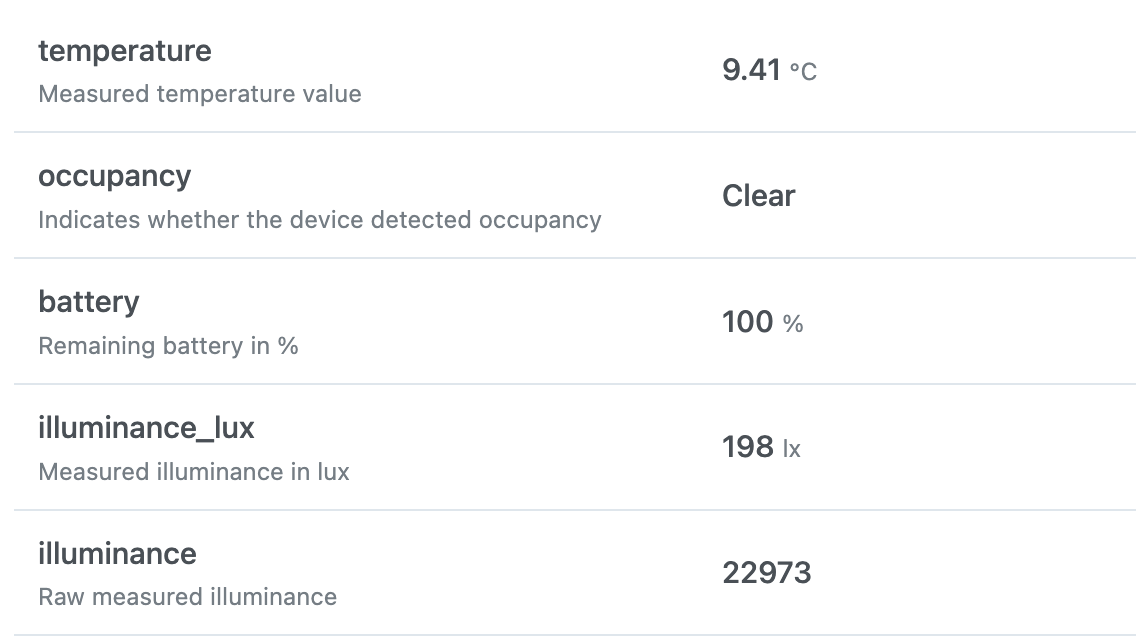
I added a test for the lux parameter, which I already use for external lights.
But this is another story 😎