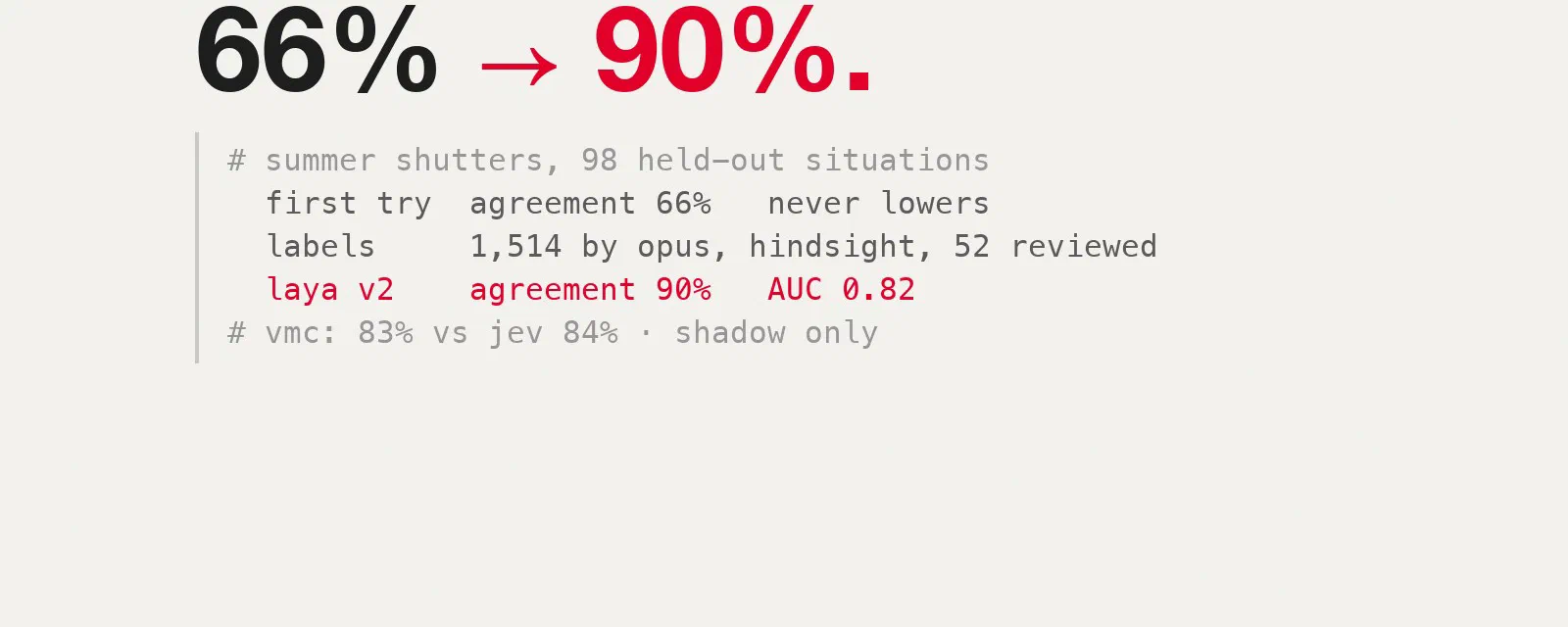

For a month now, my Home Assistant has been asking Jev the questions my YAML rules can’t answer well: should the ventilation boost right now? Should these shutters come down? Is this water flow normal? I described the setup in the first post and the history and feedback loop in the second one. Jev is TypeSafe’s hosted “System One” model: you send it a JSON state and typed questions, it sends back calibrated probabilities, for a fraction of a cent a day.
Laya, from Convai Innovations, is the open-weights alternative I’ve been following since the router benchmark, through a fine-tune on my labels and the 0.4.2 check. It speaks the same API as Jev. And there is one argument for it that no benchmark measures: if it runs at home, none of my house data goes anywhere. The humidity of my bathrooms, when the shutters move and whether someone is home are exactly the kind of data I’d rather keep on my own network.
In the second post I explained why I didn’t go local on my N100 mini PC. This time I stopped arguing and installed it. This post covers:
- running Laya in Docker on an N100 and plugging it into Home Assistant;
- what happened when I replayed two weeks of real Jev requests through it;
- fine-tuning Laya on my own house: Home Assistant data, labelled with hindsight by Claude Opus and checked by me, with Jev as the benchmark rather than the teacher;
- whether it was worth it.
Laya in a container on an N100#
The hardware is a small Intel N100 box: 4 cores, 16 GB of RAM, no GPU, and already busy with other containers. I manage it with Coolify, but any Docker host works. Laya ships its own server, laya-serve, which exposes POST /v1/systemone with the same request and response shape as Jev.
My first version installed everything at container start:
services:
  laya-api:
    image: python:3.13-slim
    restart: unless-stopped
    command: >
      sh -c "pip install --no-cache-dir torch --index-url https://download.pytorch.org/whl/cpu &&
             pip install --no-cache-dir 'laya[serve]' &&
             laya-serve"
    environment:
      - LAYA_HOST=0.0.0.0
      - LAYA_PORT=8000
      - LAYA_SERVER_PRELOAD=multilingual
      - OMP_NUM_THREADS=4
      - PYTHONUNBUFFERED=1
    volumes:
      - laya_model_cache:/root/.cache/huggingface
    ports:
      - "8180:8000"
    healthcheck:
      test: ["CMD", "python3", "-c", "import urllib.request; urllib.request.urlopen('http://localhost:8000/health')"]
      interval: 30s
      start_period: 120s

volumes:
  laya_model_cache:
It works, and it’s a good way to try Laya in five minutes. A few notes if you keep it:
- Use the CPU-only PyTorch wheel. The default one pulls CUDA libraries you can’t use on an N100 and weighs gigabytes more.
- Keep the Hugging Face cache in a volume, or every restart downloads the checkpoint again.
OMP_NUM_THREADS=4matches the N100’s four cores. Adding workers or replicas doesn’t help: each request already uses all four cores.- Pin your versions. This
command:reinstalls an unpinnedlaya[serve]on every restart, so a restart can silently bring a new version that answers differently, after several minutes of installing. Once you know you want to keep it, bake it into an image:
FROM python:3.13-slim
RUN pip install --no-cache-dir torch==2.14.1 --index-url https://download.pytorch.org/whl/cpu \
 && pip install --no-cache-dir "laya[serve]==0.4.15"
ENV LAYA_HOST=0.0.0.0 LAYA_PORT=8000 OMP_NUM_THREADS=4 PYTHONUNBUFFERED=1
CMD ["laya-serve"]
I preload the multilingual checkpoint: it reads 1,024 tokens, against 512 for the English one, and my requests are long.
Plugging it into Home Assistant#
The HA-Jev integration I use already accepts a custom address. So switching is a configuration change, not a code change: a second entry with the URL http://<your-laya-host>:8180, the model multilingual, and no API key (the integration warns about plain HTTP, which is acceptable on a LAN). The scripts that ask Jev take a config_entry, so each decision can be pointed at one or the other.
That was the easy part. What came next was less fun.
First results: it works, slowly, and the answers are wrong#
Laya cuts your request, and Home Assistant can’t see it#
My first test was a real VMC (ventilation) request, the one where Jev decides whether to run the noisy speed 2. Laya answered 0.9954, “boost”, where Jev had said 0.49. Laya looked decisive. Then I read the rest of the response:
"usage": {"input_tokens": 1024, "state_tokens": 960,
          "state_tokens_dropped": 196, "truncated": true}
The multilingual checkpoint reads 1,024 tokens in total, and 256 of them are reserved for the question and its options. My VMC state is about 1,150 tokens, because the second post gave Jev a memory: three hours of humidity per room, recent events, each room against its own daily median. Laya simply drops the end.
Two experiments showed exactly what gets lost. I put one decisive fact (“garage door open/closed”) after 1,500 tokens of filler: both versions returned exactly 0.7307, so Laya never saw it. Then, on the real request, setting away and sleeping to on, or changing the thresholds at the end of the question’s background, returned exactly 0.9954 every time. Laya cuts the end of the state, which is where my away, sleeping, outdoor data and unreliable-sensor warnings were. It also caps the question at 256 tokens and cuts the end of a long background without reporting it.
And the integration never tells you: the client reads the answers and the token counts, not the truncated flag. A truncated answer looks like any other one in Home Assistant.
Shortening the requests: only if Jev’s answers don’t change#
The obvious fix is a shorter request. A compact version of the VMC state, with the decisive facts first and one block per room, went from 1,221 to 471 tokens. But I added all that data because Jev needed it to decide well, so I set a rule: a shortening goes in only if Jev’s answers don’t move more than Jev’s own noise.
Claude Code measured that noise first: the same real request sent twice to Jev moves by 0.013 on average for the VMC and 0.007 for the shutters. Then it removed one field at a time on 50 real situations, and finally tested the combined rules on 200 more (about 1,400 Jev calls, $0.10):
| VMC change | Saved | Avg / max change in Jev’s answer | Verdict |
|---|---|---|---|
| Remove empty entries | 126 B | 0.013 / 0.05 | noise |
| Short unreliable-sensor list | 76 B | 0.009 / 0.03 | noise |
| Drop pump lines from events | 154 B | 0.039 / 0.14 | Jev uses them |
| Drop absolute humidity and ventilation gain | 104 B | 0.041 / 0.18 | used |
| Drop the 3-hour series | 741 B | 0.058 / 0.26 | used |
| Drop the background text | 1,079 B | 0.096 / 0.42 | used |
Even the “safe” rules together moved the VMC answers twice as much as noise and flipped four decisions out of 120. Only the shutters passed: keeping the series values without the min/max summaries saves 15% of the tokens with no change at all, and that went into my config. The VMC request stays as it is. It doesn’t fit in Laya, and making it fit would make Jev worse.
Is it fast enough?#
To size it, I counted two weeks of real Jev calls: 1,416 calls, 101 a day, 4.2 an hour on average. The busiest minute had 4 calls, at :00 and :30 when the scheduled questions line up. On the N100, with nothing else asking:
| Request | Time |
|---|---|
| Full VMC request (1,024 tokens, truncated) | 4.9 s (7.8 s for the first call) |
| Compact VMC request (325 tokens) | 1.0 s |
| 4 requests at the same time | 5.3 / 10.2 / 15.1 / 19.9 s |
laya-serve handles one request at a time, so a burst queues. With 4 at once, the last answer takes 20 seconds, inside the integration’s 30-second timeout but without much room. The cost grows faster than the length, so a shorter request is the real speed-up, more than any CPU setting. Over a day, though, it’s about 8 minutes of CPU work. For a house, slow is fine. I’d happily wait 5 seconds for a ventilation decision if it means my data stays home.
The real test: two weeks of real requests#
Until then I only had one real request. But prompt logging was on in my OpenRouter account, so the real requests were all there. Claude Code read them in the browser, after I signed in myself: 1,416 requests from 11 to 25 October, each with the exact JSON Home Assistant sent and Jev’s answer. These logs show when people are home, so they stayed on my laptop, out of every repository.
Each request went to Laya unchanged. After 396 of them the picture was clear:
| Question | Laya base | Jev |
|---|---|---|
| VMC boost | truncated every time; “yes” at 0.994–0.999 every time | “yes” 18% of the time |
| Shutters | “lower them” 99% of the time | once |
| Garden watering | “yes” 100% of the time | never |
| Which light to turn on | same choice as Jev 27% of the time |
The truncation isn’t the main problem. With the full state visible on a hand-made example, a shower happening now (90.8%, +16 points in 15 minutes), a shower an hour ago, flat humidity and “everyone asleep” all scored between 0.980 and 0.992. I gave it the facts as numbers, as words (“rising fast, fresh steam”) and as a plain fresh_steam: true flag: none of it moved the answer the right way. On the VMC, its ranking of situations was barely better than chance (AUC 0.60 against Jev’s decisions).
That matches Laya’s own documentation: it’s a 322M-parameter encoder (mmBERT-base) pre-trained on generic decision tasks, its yes/no answers can follow the wording of the options rather than the state, and the authors say to treat it as a base to specialise. A temperature or a threshold can’t fix it: they rescale the scores, but keep their order, and here the order is wrong.
So, in its base form, Laya can’t replace Jev in my house. It needs training. The real question is: trained on what?
Teaching Laya my house#
The shortcut I didn’t keep#
The obvious target was right there: 1,416 requests, each with Jev’s answer. Training Laya to reproduce those answers is distillation, and TypeSafe’s customer agreement (§2.3(b)) rules it out: you may not use the service or its output “to perform model distillation” or to “train a model to imitate the output of the Services”. There is no exception for personal use.
To be transparent: I tried it once, locally, as a first test, to see whether Laya could learn my house at all. It could. After one hour on my MacBook, its VMC decisions went from 14% to 93% agreement with Jev on days it had never seen. But that model was a copy of Jev: I couldn’t run it with a clear conscience, and it could never be better than Jev. So I deleted the checkpoint and the Jev-labelled training data, and started again with labels that don’t come from Jev. That second model is what this post is about.
I’m not the only one curious about this. On GitHub, Mini-Jev distils Jev into a small Qwen model and itself warns readers to check TypeSafe’s terms. Others, like Kev or system-one-open, train on public datasets or their own synthetic labels instead, which is the clean route.
Labels from Home Assistant, judged with hindsight#
Home Assistant already knows what happened after each decision: whether the bathroom humidity kept climbing after a “no boost”, whether the living room reached 28 °C on the afternoon the shutters stayed up. A judge that sees both the moment of the decision and the hours after it can say what the right call was, without asking Jev.
All the inputs come from my Home Assistant:
- October: 1,411 real decisions. The exact states Home Assistant sent between 11 and 25 October, VMC, shutters and the rarer questions. For each one, the recorder adds what happened next: raw sensor readings for the following hour since mid-October, hourly statistics before that.
- Summer: 608 shutter situations. My shutter automation only started asking Jev in the autumn, when the answer is always “keep them up”, so there was nothing to learn about lowering them. But Home Assistant keeps hourly long-term statistics (mean, min, max) for years. From those, Claude Code rebuilt the shutter decision for each zone and each hour from May to September: indoor and outdoor temperature, the façade sensors in the sun, the last four hours, the sun’s position. It then sampled 608 of them across hot, warm and cool days, together with how hot each room got later that day.
The judge is Claude Opus, through Claude Code sub-agents working from a written rubric. Boost when a wet room shows fresh steam (roughly +5 points in 15–30 minutes) and hindsight shows it’s real, not a sensor glitch. Lower the shutters if the room will reach about 26 °C later today and the sun is on that façade. For everything else, common sense and the question’s own background. Each label is a probability, not a yes/no (0.95 for “clearly boost”, 0.6 for “leaning”), with a one-line reason such as “parents’ bathroom +11 to 82.8, fresh shower steam”. That’s 2,019 labels in total.
Then I checked the judge. Claude Code gathered the 52 most debatable cases and I reviewed each one myself. One disclosure: to find the hard cases quickly, it picked them where Opus and Jev disagreed. I agreed with Opus on all 52, so no label changed. Jev’s answers were never used as labels; they’re kept for comparison only.
Jev isn’t the ground truth#
This turned out to be the most interesting part. Over the 831 October VMC requests, Jev and the hindsight labels agree on 743, about 89%. The disagreements aren’t random:
- 53 times the judge would have boosted and Jev didn’t. Almost always the start of a shower: “upstairs bathroom +12 to 81.5, fresh shower steam”. Jev usually saw it too, but scored 0.45–0.59, just under my 0.6 threshold.
- 35 times Jev boosted and the judge wouldn’t have. In 31 of them the boost was already running: the kitchen or bathroom was back to its usual level, and Jev kept the noisy speed 2 on.
- The night water heater: a few times Jev said “heat tonight” where the judge leaned no, for instance with only one person home.
Some of this is my thresholds as much as Jev. But it makes the point: Jev is a good benchmark, not the truth, and a model trained to copy it inherits its misses.
What Laya actually is, and what training changes#
Laya isn’t a chat model and never writes text. For each question it builds one sequence:
[CLS] <question type> instructions [SEP] [MASK] option 1 option 2 ... [SEP] state JSON [SEP]An encoder reads the whole thing at once, and a small head on top turns it into probabilities over the options: noul: 0.12, or one probability per choice. One forward pass, no reasoning steps, which is why a 322M model answers in about a second on a mini PC CPU.
Fine-tuning changes the weights, not the program. For each training example, Laya predicts, the prediction is compared with the target, and all the weights move a little towards it. Do that a few hundred times with a small learning rate, and the model adapts to your questions without forgetting the rest. With probabilities as targets, it also learns the doubt: a 0.6 teaches “leaning yes”, not “yes”.
Laya ships its own training code, laya.train, which was better than reverse-engineering the Kaggle notebook linked from the model card.
Training it#
Each training row is a state plus the judge’s probability:
{"state": {...},
 "questions": {"answer": {"type": "noul", "instructions": {...}, "criteria": {...}}},
 "gold": {"answer": {"probabilities": {"false": 0.05, "true": 0.95}}}}
The important choices were:
- Split by time, not at random. Train on 11–21 October and on the summer days, except 16–31 August. Test on 22–25 October (402 requests) and on 16–31 August (98 shutter situations). A random split would put almost identical consecutive VMC requests on both sides, and the score would look much better than it is.
- Never cut anything. The model only needs to work for Laya, so it gets a compact state: the decisive facts first and a short VMC background. Every row was checked with Laya’s own
build_sequence: if a single state token would be dropped, a fallback rule shortens the series, then removes the oldest events one at a time. Final result: every input fits in 1,024 tokens with 0 tokens dropped. - Probabilities as soft targets, converted to Laya’s format for each question type (
noul,choice).
The training script is short, because laya.train does the work:
from laya.train import TrainConfig, finetune

cfg = TrainConfig(
    epochs=6,
    micro_batch=2, grad_accum=8,   # effective batch of 16
    encoder_lr=2.5e-5,
    loss="soft-ce",                # match the label's probability, not just yes/no
    gradient_checkpointing=True,   # 1,024-token inputs in 16 GB
    seed=0,
)
finetune(data="train.jsonl", model_dir="laya/multilingual",
         output_dir="ckpt/house-v2", config=cfg, device="mps")
Three settings worth explaining:
- 6 epochs, effective batch 16: 516 optimizer updates on 1,363 rows, with 151 more kept aside for calibration. The defaults would give far fewer, and Laya’s code itself warns that too few updates can collapse the model to a constant answer, the very problem I was trying to fix.
soft-celoss instead of the defaultrlcd: soft cross-entropy is the natural objective when the target is a probability, and Laya’s own notes say the RL term gave no gain here.- Gradient checkpointing: without it, 1,024-token sequences don’t fit in the M4’s 16 GB of memory. It’s not exposed by the CLI, which is why I called
finetune()from Python.
It starts from Laya’s base weights, not from the deleted Jev copy. The run took 1 h 48 on the M4’s GPU (MPS), with nothing leaving the laptop, and the loss went from 0.45 to 0.27. It can’t reach zero when the target itself is 0.6; the held-out days are what tell you whether it worked.
The results on days it never saw#
Every answer is turned into a decision at the threshold my automation really uses, and compared with the reviewed hindsight labels:
| Held out | Jev | Laya, first test (trained on Jev, deleted) | Laya v2 (hindsight labels) |
|---|---|---|---|
| VMC 22–25 Oct: same decision as the labels (244) | 84% | 79% | 83% |
| VMC: ranking of situations (AUC) | 0.95 | 0.85 | 0.93 |
| VMC: boosts missed (out of 53) | 29 | 43 | 37 |
| VMC: unneeded boosts | 10 | 8 | 4 |
| Shutters 22–25 Oct (145, none needed) | 100% | 100% | 100% |
| Summer shutters 16–31 Aug (98, 33 should lower) | never asked | 66% | 90% |
| Summer shutters: missed / unneeded lowerings | 33 / 0 | 9 / 1 | |
| Rare questions, 22–25 Oct (13) | 85% | 85% | 77% |
For reference, base Laya scores 22% on the VMC and 34% on the summer shutters: it says yes to everything.
What I read in it:
- The summer shutters are the real gain. Jev was never asked about lowering shutters in summer, and the first test, trained on autumn answers, learnt only “keep them up”. Trained on five months of statistics, v2 lowers them in 24 of the 33 situations where it should, and only once when it shouldn’t. That’s a decision my house had no data for before.
- On the VMC, v2 ties Jev; it doesn’t beat it. 83% against 84%, and more cautious: fewer unneeded boosts (4 against 10), more missed ones (37 against 29). Most misses are borderline. For a noisy fan I prefer that side, but it isn’t “better than Jev”.
- It’s graded by the judge it learnt from. v2 learnt from Opus labels and is scored against Opus labels; Jev wasn’t. That flatters v2. My review of the 52 disputed cases is the only independent check. The honest reading is “comparable to Jev on the VMC, plus summer shutters”, not “beats Jev”.
- The shutter state comes from hourly statistics, a coarser view than a live request. Before it decides anything, Home Assistant must send that same format. That’s a job for next spring.
- It learnt my house, not reasoning. Ask it a new question tomorrow and you’re back to the base model. And the 13 rare questions are too few to judge.
Serving the checkpoint#
The good news: it’s the same program and the same image. laya-serve loads extra checkpoints from the LAYA_EXTRA_MODELS variable, a local folder or a Hugging Face repository. The checkpoint folder is about 650 MB (model.safetensors, rl_agent_config.json, questions.json, encoder/, tokenizer/; the optimizer state isn’t needed).
I wouldn’t touch the running container for a trial. A second service next to it is enough:
services:
  laya-shadow:
    build: .                      # the Dockerfile above
    restart: unless-stopped
    environment:
      LAYA_EXTRA_MODELS: '{"house-v2": "/models/house-v2"}'
      LAYA_MODELS: house-v2
      LAYA_DEFAULT_MODEL: house-v2
      OMP_NUM_THREADS: "4"
    volumes:
      - ./house-v2:/models/house-v2:ro
    ports:
      - "8181:8000"
With LAYA_DEFAULT_MODEL, Home Assistant doesn’t even need to name the model; otherwise it sends "model": "house-v2". A private Hugging Face repository with an HF_TOKEN also works, but a local folder is simpler and keeps the weights on your network. Watch the RAM: the model itself needs about 1.3 GB, and docker stats shows my current Laya container at about 5 GB, page cache included, on a 16 GB box that runs other things too. The speed doesn’t change, since the model has the same size: about 1 second for a short request, 5 for a long one.
One real change remains on the Home Assistant side, and it’s not optional: it must send the states the model was trained on, the compact VMC state and the statistics-based shutter state. The full Jev request would be cut at 1,024 tokens again, and the model would see something it was never trained on.
Was it worth it?#
As an experiment, yes, clearly. A few things I take away:
- The install is the easy part. A Jev-compatible API means a Docker container and a URL in Home Assistant. That’s genuinely nice.
- Check
truncatedbefore anything else. A model that silently cuts the end of your request will look confident and be wrong, and Home Assistant won’t tell you. - An N100 is enough for a house, at about 100 decisions a day. Slow isn’t a problem here; bursts are, and shorter requests fix them better than hardware.
- Base Laya is not a decision engine for numeric house states, and its authors say so. Fine-tuned, it becomes surprisingly good at my questions, after less than two hours of training on a laptop.
- Copying Jev was the wrong target anyway. Leaving the terms aside, a copy inherits Jev’s misses and learns nothing where Jev was never asked. Hindsight labels gave me summer shutters, which no amount of Jev data would have.
- An LLM with hindsight is a useful labeller, if you check it. The recorder has the facts; the judge turns them into 2,019 calibrated labels; a person still has to look at the hard cases.
- The house still runs on Jev. v2 is good enough for shadow mode on the VMC: Home Assistant asks both, acts on Jev, and logs Laya next to it. The shutters will join next spring, once the template sends the right state.
The bigger lesson is still about the data. My scoreboard collects my own “who was right?” answers, and the outcome checks record what really happened after each decision. Those labels are mine, they need no judge, and they’re the best target of all. The hindsight judge is a way to start before I have a thousand of them; the next training run will mix both.
If you’re running Laya, or any Jev-compatible model, at home, I’d really like to hear how you handle the context window and what you train it on. The comments are open.
How it was built#
Several Claude Code sessions with Opus 5.5. The first one started from my “let’s replace Jev with Laya”, worked out how the integration talks to Jev, found the truncation, measured the N100, read my OpenRouter prompt logs in the browser (I signed in myself), replayed them through Laya, and tested every shortening against Jev’s noise before changing a single template. A second one built the first dataset, ran the Jev-trained test on my MacBook and checked how to serve a checkpoint. After I reviewed a first draft of this post, a third one rebuilt five months of decisions from a read-only copy of the Home Assistant recorder, had Opus sub-agents label 2,019 of them with a written rubric, prepared the 52 disputed cases for my review, trained and evaluated v2, deleted the Jev-trained test, and rewrote this post. My part was deciding what to test, insisting that Jev’s answers must not change, reviewing the judge’s hard cases, and deciding what to keep and what to publish.