
LG Watch R Review#
After two weeks with my new LG Watch R smartwatch I can finally make a little review about it. I preferred to use it for a while because I wasn’t really convinced about the need for a smartwatch.

Installation / First Usage#
The Android Wear watch is really simple to use and pair with your smartphone: naturally you need an Android phone with Bluetooth 4.0 (or greater) which means you need at least Android 4.3. If you are not sure about your phone, visit the following address from your smartphone to check compatibility:
http://www.android.com/wear/check/
You should see something like this if everything is compatible.

To pair it with the phone you just need to install the Wear application from Google Play Store and follow the instructions.
Applications and Faces#
The first real problem, probably due to my skepticism, is figuring out what you can do with this new watch. You need to control your Wear watch from your Android phone: an application is installed on your phone and then a part of it is copied to the smartwatch too. This means that all apps already installed on your phone that have a Wear companion will sync automatically after the watch pairing (e.g. Runtastic).
What do you need then? A cool thing to have is a new personalised face for your watch. On the Play Store you can find many applications offering one or more faces. Personally, after some tests, I think the best one is WatchMaker. It is an application that allows you to create or download as many faces as you want, using all your watch sensors. A good starting point to download faces is FacesRepo. Start browsing and look for your preferred face (for today… tomorrow you can change it once again).
I just want to note that a possible battery drain problem could be the face you installed. I tested Beautiful Weather Watch Face which completely drained my battery in less than a day. So pay attention to what you install.
Battery Life#
I actually reached a really good battery life.
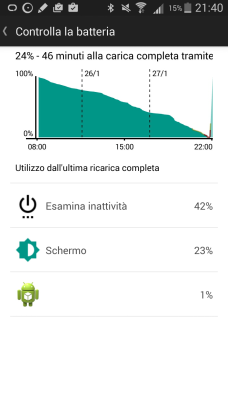
I am getting close to 3 days without any charge!
Sure, I am not looking at the watch every second like the first days, but I am receiving many emails, messages, and calls and my watch vibrates and shows notifications all day long. Compared to other smartwatches on the market (from what I can read online), this is really good. The battery can be fully charged in about 1 hour.
Included Gadgets#
The LG Watch R, like any watch you can find on the market today, includes many sensors: 9-Axis (Gyro / Accelerometer / Compass), Heartbeat, Barometer and Microphone. With the accelerometer/gyro, for example, the watch screen automatically turns on when you turn your hand to see the watch. The heartbeat sensor works, but it is pretty useless. If you need a sport watch, it is better to buy a sport watch. The microphone is for “Ok Google” commands. Since almost all Google requests need an internet connection, you need your phone nearby. But anytime I use it I feel like Michael Knight.

Conclusion#
Do I really need a smartwatch? I do not think so (and it is too expensive for what you get). An Android Wear smartwatch is really just a device that needs to be used with a phone: without it your smartwatch cannot do anything. It gives you real-time notifications: the watch vibrates for an incoming call, mail, phone notification, and more. You can read the information directly on it: who is calling, the mail content (not so easy to read a complex or long mail on the watch), a text message content. You can finally leave your phone in your pocket and only take it out when needed.