# Optimize Ghost for SEO - Keywords
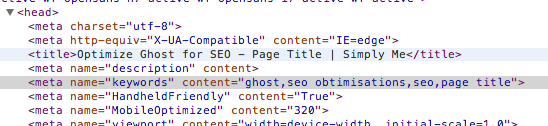
The usage of meta *keywords* is today maybe not too useful: Google says that robots does not take care to this meta anymore.
But, in the SEO rules, and in the SEO Wordpress plugin too, this meta information is always set.
I decided to add it on my blog. This update requires a Ghost core change.
Edit the **core/server/helpers/index.js** file and add the following functions (it does not exist), after the *meta_description* one:
coreHelpers.meta_keywords = function (options) {
    /*jslint unparam:true*/
    var keywords,
        blog;

    if (_.isString(this.relativeUrl)) {
        if (!this.relativeUrl || this.relativeUrl === '/' || this.relativeUrl === '' || this.relativeUrl.match(/\/page/)) {
            blog = config.theme();
            keywords = '';
        } else {
            keywords="";
            if (this.post && this.post.tags) {
                this.post.tags.forEach(function(value) {
                    if (!keywords=="") {
                        keywords+=",";
                    }
                    keywords+=value.name;
                });
            }
        }
    }
    return filters.doFilter('meta_keywords', keywords).then(function (keywords) {
        keywords = keywords || "";
        return new hbs.handlebars.SafeString(keywords.trim());
    });
};
This function, when you are on a post page, will check for post tags and create the meta keywords with them.
In the same file, at the end into the **registerHelpers** function, add the following line where you want (for example after the *meta_title* line):
registerAsyncThemeHelper('meta_keywords', coreHelpers.meta_keywords);
Save the file.
You just need to use now your keywords meta into your theme.
TO do this, open the **default.hbs** file, and, after the *meta_description* line, add:
<meta name="keywords" content="{{meta_keywords}}" />
Save, restart the NodeJS server and enjoy your new SEO functionality.