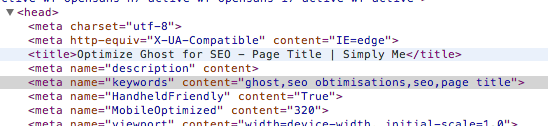
Overview#
The usage of meta keywords is today maybe not too useful: Google says that robots no longer takes this meta tag into account. But, it’s still commonly set in SEO rules and in WordPress SEO plugins, this meta information is always set.
I decided to add it on my blog. This update requires a Ghost core change.
Adding the Helper#
Edit the core/server/helpers/index.js file and add the following functions (it does not exist), after the meta_description one:
coreHelpers.meta_keywords = function (options) {
    /*jslint unparam:true*/
    var keywords,
        blog;

    if (_.isString(this.relativeUrl)) {
        if (!this.relativeUrl || this.relativeUrl === '/' || this.relativeUrl === '' || this.relativeUrl.match(/\/page/)) {
            blog = config.theme();
            keywords = '';
        } else {
            keywords="";
            if (this.post && this.post.tags) {
                this.post.tags.forEach(function(value) {
                    if (!keywords=="") {
                        keywords+=",";
                    }
                    keywords+=value.name;
                });
            }
        }
    }
    return filters.doFilter('meta_keywords', keywords).then(function (keywords) {
        keywords = keywords || "";
        return new hbs.handlebars.SafeString(keywords.trim());
    });
};
This function, when you are on a post page, will check for post tags and create the meta keywords with them.
In the same file, at the end into the registerHelpers function, add the following line where you want (for example after the meta_title line):
registerAsyncThemeHelper('meta_keywords', coreHelpers.meta_keywords);Save the file.
Using in Theme#
You just need to use now your keywords meta into your theme. To do this, open the default.hbs file, and, after the meta_description line, add:
<meta name="keywords" content="{{meta_keywords}}" />Save, restart the NodeJS server and enjoy your new SEO functionality.