# OVH VPS SSH Broken Pipe (Timeout): How to keep alive
I recently noticed that on my OVH VPS Server, SSH sessions remain blocked (appended with Write failed: Broken pipe message after a while) when I leave them unused for a while (about 30 seconds). This means you will need to reconnect once again, and all ssh/bash processes from the previous connection will be alive (waste of memory!).
I think there is a proxy (new proxy? knowing I didn't have this problem before) between me and my server that kill idle connections.
To solve this problem you can change settings on the client, adding ServerAliveInterval property in you sshd config file.
If you are on Linux or Mac client, you need to edit sshd_config:
sudo vi /etc/ssh_config
Append to the end of file
ServerAliveInterval 30
which means your client sends an handshake message any 30 seconds to the server.
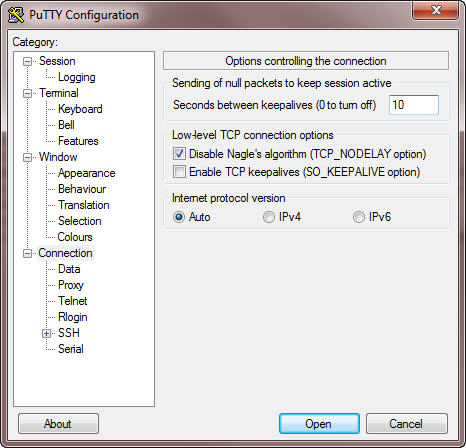
If you have a windows client you can set the KeepAlive like in the following screenshot
 Now all your ssh connection should be kept active even if you leave your computer for a coffe ;)