

Your AI Agent Deserves a Tool Harness, Not a Wild West
How we built a proxy-driven, benchmark-validated ecosystem for LLMs, and why your company's MCP servers and SKILLS should come with unit tests
Search for a command to run...
How we built a proxy-driven, benchmark-validated ecosystem for LLMs, and why your company's MCP servers and SKILLS should come with unit tests
No comments yet. Be the first to comment.
and why it took two completely different approaches to get it right.

Following the Trail from the Cultura & FFT Breaches to SendGrid Abuse

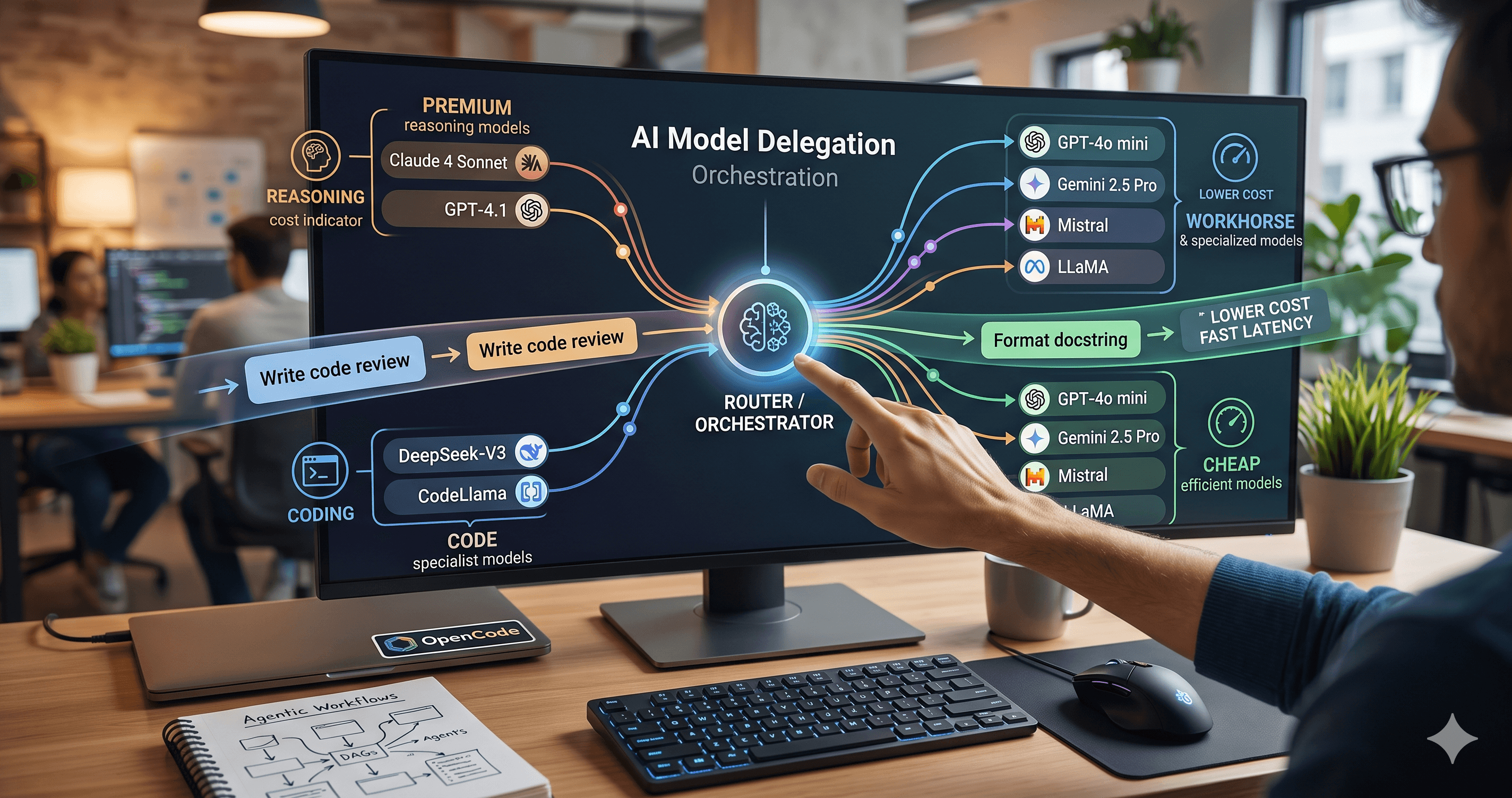
Beyond the single-model myth: Implementing intelligent multi-agent routing and DAG workflows with AI Dispatch.
Introduction: The Black Box of AI Code Generation When you ask GitHub Copilot to write a function, refactor a module, or explain a complex piece of code, the response you get is the output of a probab

We started the same way everyone does: give the LLM access to everything and hope it figures it out. Connect the GitHub MCP, the Jira MCP, the internal product API MCP, throw in a database schema or two, and let the model roam.
It worked, sort of. The model could answer questions. It could perform actions. But every session was unpredictable. It called the wrong tool, cycled through irrelevant APIs, hallucinated endpoint parameters, and burned tokens on data it never needed.
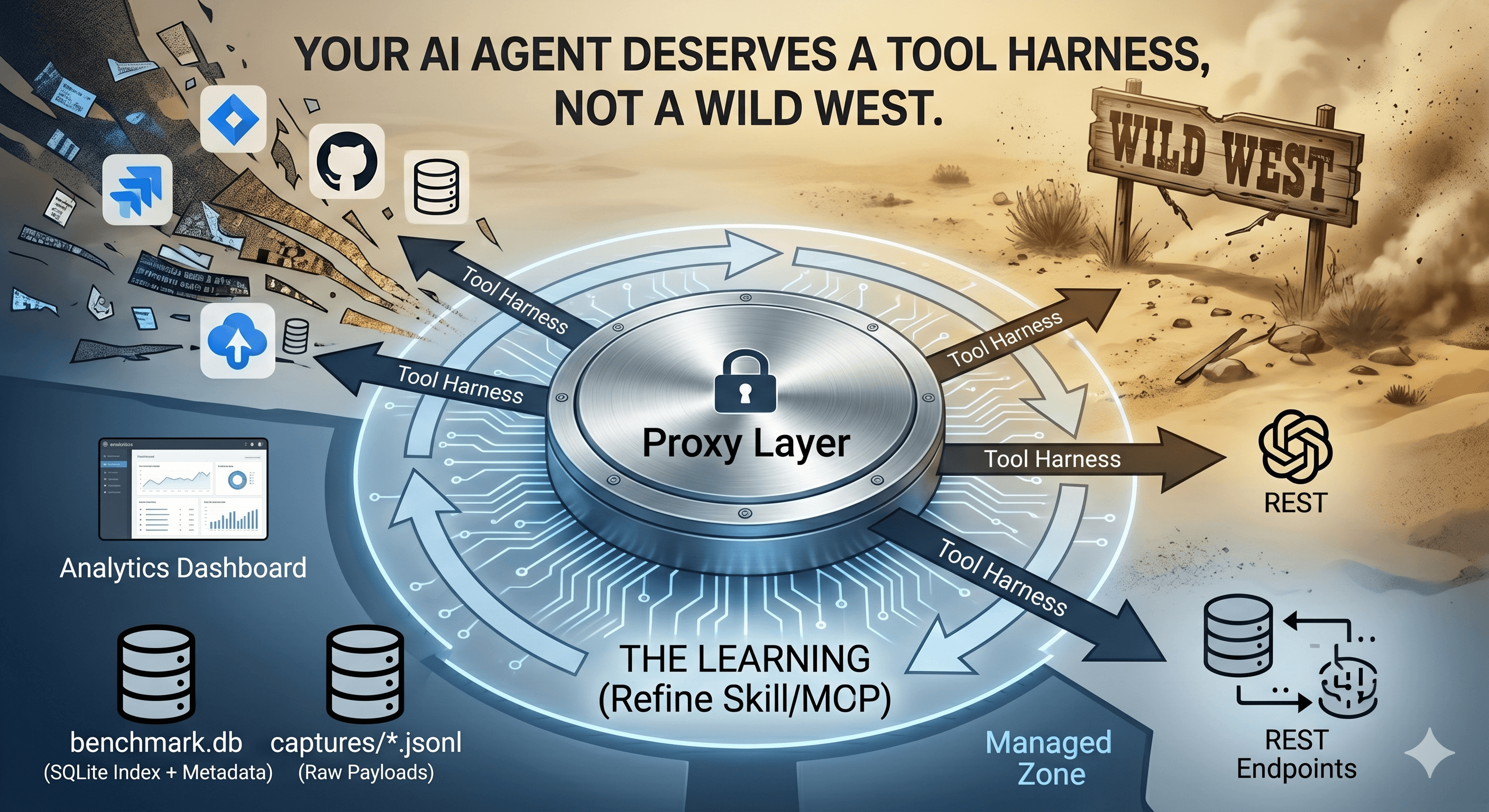
A few weeks ago, we started building something different: a harness. Not just more tools, but a curated ecosystem with a proxy that watches everything, a benchmark engine that measures what matters, and a learning loop that turns raw captures into measurable improvements.
The early results are already interesting, and we're just getting started.
The easiest thing in the world is to wrap an internal API in an MCP server and call it done. You generate an OpenAPI spec, point a tool at it, and the LLM now has access to 47 endpoints.
Does it help? Marginally. The model sees function signatures instead of REST paths. But it still needs to figure out which endpoint to call, in what order, with what parameters, and what to do when it fails.
An MCP is not a user interface. An MCP is a transport layer. The value doesn't come from exposing more endpoints, it comes from designing operations that match what the LLM actually wants to accomplish.
Your product API has:
POST /cart/items — add an item
PUT /cart/items/{id} — update quantity
DELETE /cart/items/{id} — remove an item
POST /cart/checkout — start checkout
GET /cart/delivery-options — available shipping
POST /cart/delivery-option — select shipping
POST /cart/payment — submit payment
GET /cart/order-confirmation — get receipt
The LLM doesn't want to orchestrate an 8-step checkout flow. It wants one MCP tool called complete_checkout(cart_id, shipping_method, payment_token) → order_summary that handles the orchestration internally. The raw API endpoints are available for the humans on the frontend team. The MCP should expose intents, not endpoints.
The rule: if an MCP tool signature looks like it was copied from a Swagger UI, you're doing it wrong. An MCP should simplify the model's cognitive load, not mirror the API's internal structure. If you want to use raw APIs, create a SKILL, add the OpenAPI doc as sources and the LLM will know what to do without creating an extra MCP.
Raw tools tell the LLM what it can do. A Skill tells it how to do something: the process, the order, the error recovery, the edge cases to check.
# internal-app-referential

Retrieves asset information from the product registry using direct GraphQL queries.

## When to use
- User asks about products, components, or their relationships
- User needs technology stack information across the portfolio
- User asks for domain-level views (finance, hr, ecommerce, ...)

## Process
1. Call `read_skill` to load these instructions
2. Use `http_request` to call the GraphQL endpoint
3. For simple counts: use the `aggregateProductCount` query
4. For domain filtering: add the `domain` argument
5. For technology queries: use the `componentsWithStack` query
6. If HTTP 4xx or 5xx: retry once, then report the error to the user

## Important
- Always query for the specific fields requested — don't fetch everything
- Paginate when querying lists (20 per page)
- If a query returns no results, report "no data found" — don't guess
This can be part of a real skill to let the LLM navigate through a product referential. It's not code, it's instruction design. The LLM reads it, internalises the process, and executes it with the tools available.
We all learned this the hard way. Early skills were 3000+ word essays covering every possible variation, trying to script the unpredictable world of an LLM into a single predetermined path. Do we really need AI in that case? The LLM would lose track of the actual process inside all the documentation when the size is increasing.
Every skill follows a context budget now:
Name + Description: fits in the system prompt's skill listing (1-2 lines each)
Full instructions: loaded on-demand via read_skill, must fit in ~15 agentic steps
One process per skill: no branching into unrelated workflows
If a skill exceeds these constraints, it gets split. The LLM's working memory is finite, treat it that way.
The API world has largely moved to pay-per-token pricing. Monthly subscription packages still exist for some consumer-facing products (GitHub Copilot, for example), but the major LLM providers: OpenAI, Anthropic, Google, charge per token consumed. [1] [2] [3] [4]
For API access, there's no predictable monthly bill anymore, just meters running on every request, every system prompt, every tool schema, every verbose response.
| Provider | Input ($/1M tokens) | Output ($/1M tokens) | Notes |
|---|---|---|---|
| OpenAI GPT-5.2 | $1.75 | $14.00 | |
| OpenAI GPT-5 Mini | $0.25 | $2.00 | Low-cost tier |
| Claude Sonnet 4.6 | $3.00 | $15.00 | Long-context premium above 200K input |
| Gemini 2.5 Pro | $1.25 | $10.00 | Higher rates above 200K input |
| GitHub Copilot Pro | $10/month | flat seat | Usage limits apply; pausing new sign-ups as of April 2026 [5] |
GitHub Copilot is changing its individual plans on June 1, 2026. [5] The company announced tighter usage limits, model availability changes (Opus removed from Pro plans), and a shift toward token-based weekly limits. If you're using Copilot as part of your harness, this is worth watching.
Every token in every system prompt, every tool schema injected, every verbose API response: you pay for it.
This changes how you design your harness. When the AI wants a customer name, giving it the full customer object (address, preferences, order history, payment methods, 15 nested relationships) is not just bad design, it's expensive bad design.
Here's the part that took me a while to articulate clearly: it's not just the MCP layer that needs rethinking. Your product APIs themselves should be designed with LLM usage in mind.
An LLM calling a standard REST endpoint gets everything back: every field, every nested object, every related resource. That's fine for a frontend that can display what it needs and ignore the rest (is fine, but your anyway wasting resource usage). For an LLM, every field is a token it has to process, and tokens cost money.
The solution isn't always "add an MCP on top." Sometimes it's worth going back to the API itself and asking: what would this look like if an AI agent were the primary consumer?
The pattern we could use: either design dedicated "lookup" endpoints that an LLM could query to retrieve only a subset of the fields, or wrap existing APIs with a thin MCP layer that does the filtering and conversion:
# What the product API exposes to humans
query {
  customer(id: "123") {
    name, email, address, phone, preferences, paymentMethods,
    orders { items, total, status, history }
  }
}

# What an LLM-friendly API could expose
query {
  customer(id: "123") {
    name              # → "Marco Mornati"
    # That's it. Just what the model asked for.
  }
}
The second query costs a fraction of the first in tokens, and the model gets exactly the information it needs without noise.
This applies beyond GraphQL: wherever your LLM makes API calls (REST, gRPC, anything), the principle is the same: query for what you need, not what exists. Either the API supports fine-grained field selection, or an MCP layer filters the response before it reaches the model. The MCP is often the right choice for existing products you can't modify, but for new APIs, design them AI-native from the start.
You cannot optimise what you do not measure. This is where the proxy and benchmark tools can change everything.
The proxy sits between every LLM client and the upstream provider. Every request, response, tool call, timing metric, and token count is captured, without changing a single line of application code.

The proxy has two modes:
Server mode: runs as an HTTP server. Point any OpenAI-compatible client at it, and every interaction is transparently captured.
Benchmark/CLI mode: runs headless from YAML config files, executing prompts through the LLM with automated MCP/Skill execution, then saving everything for analysis.
This is the part I'm most excited about. A benchmark config file looks like this:
project: my-app

model: gpt-5-mini

system_prompt: >-
  You are a helpful assistant. Skills provide specialised instructions.
  Always use `read_skill` to load skill instructions before acting.

skills:
  - name: my-skill
    path: ./skills/my-skill/SKILL.md

env:
  - GRAPH_URL
  - API_KEY

max_iterations: 30

prompts:
  - text: "How many products and components do we have?"
    asserts:
      - type: tool_called
        tool: read_skill
        times: 1
      - type: tool_called
        tool: http_request
        times_min: 1
      - type: tool_result_not_contains
        tool: http_request
        value: "HTTP 4"
      - type: response_contains
        value: "product"
      - type: response_contains
        value: "component"

  - text: "Which services have no monitoring? Flag any Tier-1 ones."
    asserts:
      - type: tool_called
        tool: read_skill
        times: 1
      - type: tool_called
        tool: http_request
        times_min: 1
      - type: tool_result_not_contains
        tool: http_request
        value: "HTTP 5"
      - type: response_contains
        value: "monitor"
These are unit tests for AI behaviour. Each prompt has assertions that check:
Was the right tool called? (tool_called)
Was it called the right number of times? (times:, times_min:, times_max:)
Did the tool return errors? (tool_result_not_contains: "HTTP 4")
Did the final response contain the expected information? (response_contains:)
The benchmark engine runs every prompt through the LLM, executes any tool calls the model makes (including MCP tools), evaluates every assertion, and produces a pass/fail report:
Running benchmark: my-app
Model: gpt-5-mini | Prompts: 9 | Skills: 1

[1/9] "How many products and components do we have?"
  ✓ tool_called: read_skill (1)
  ✓ tool_called: http_request (min 1)
  ✓ tool_result_not_contains: http_request → "HTTP 4"
  ✓ response_contains: product
  ✓ response_contains: component
  Score: 1.0 / Assertions: 5 passed, 0 failed

[2/9] "Which services have no monitoring?"
  ✓ tool_called: read_skill (1)
  ✓ tool_called: http_request (min 1)
  ✓ tool_result_not_contains: http_request → "HTTP 5"
  ✓ response_contains: monitor
  Score: 1.0 / Assertions: 4 passed, 0 failed

...

Run score: 92.3 — passing
Each capture is also scored automatically based on tool call quality:
| Condition | Score |
|---|---|
| Tool execution failed (error) | 0.0 |
Empty result ("" or {}) |
0.3 |
| Duration > 30,000ms | 0.2 |
| 1,000ms < Duration ≤ 30,000ms | Linear decay 1.0 → 0.0 |
| Duration ≤ 1,000ms | 1.0 |
| No tool calls | 1.0 |
The run score is the average across all captures, giving you a single number (0–100) that tells you how well your harness is performing.
Here is where it gets powerful. The benchmark is not a one-shot validation — it's a learning loop:

Step 1: Run the benchmark. The proxy executes every prompt, saves every capture as a JSONL file in ~/.benchmark/.
Step 2: Inspect the captures. Each capture is a JSON object containing the full request, response, every tool call the model made (with arguments, results, timing), and assertion results.
Step 3: Analyse the failures. Why did the model call the wrong tool? Why did it get HTTP 400? Why did it skip the error recovery step? The raw captures tell you exactly what happened — no guessing.
Step 4: Improve the skill. Edit the SKILL.md, clarify the process, add missing error handling, adjust the description to route better. Then hand the skill file AND the failing captures to an LLM and ask: "Here's what went wrong. Fix it."
Step 5: Loop. Re-run the benchmark. Did the score improve? Did any previously passing prompts regress?
The goal is to run this loop regularly: benchmark, inspect, improve, re-benchmark. Even early iterations have shown us things we'd never have caught without the captures. The more consistent the loop, the faster the harness improves.
And, if you don't care a lot about your token (so far we could do it) you can ask to the LLM to do this loop autonomously with a stop KPI. It can runs for hours!!
The learning loop also accounts for cost. After each run, we measure:
Total tokens consumed (input + output)
Tokens per assertion passed: a cost-efficiency metric
Token overhead per prompt: how many tokens were spent on tool schemas vs actual data
When improving a skill, we track whether the fix reduced or increased token usage. Sometimes a more detailed skill instruction causes the model to call more tools, consuming more tokens. The dashboard flags these regressions so we can find the sweet spot between accuracy and cost.
Example from the scoring engine:
Run: asset-knowledge-graph-direct v3 → v4
  Score: 85.3 → 92.1  (+6.8)
  Tokens/run: 12,450 → 14,220  (+14%)
  Cost/run: \(0.032 → \)0.037

Efficiency score: 6.8 / (14% token increase) = 0.49 pts per % cost
Verdict: Acceptable improvement. Monitor for scope creep.
One more feature worth mentioning: before a benchmark even runs, an optional routing jeopardy mode pre-computes which skill or MCP each prompt should route to. If two skills have descriptions similar enough to confuse the LLM (Jaccard similarity within 5 points), it flags a conflict.
This catches a surprisingly common problem: you add a new skill, its description overlaps with an existing one, and suddenly prompts start routing to the wrong skill. The jeopardy report tells you before the benchmark run finishes.
MCP servers are not UIs. A 1:1 wrapper over a product API adds marginal value. An MCP that exposes high-level intents, matching what the LLM actually asks, is worth ten times more.
Skills need size limits. The LLM's context window is generous but its attention is not. Keep skills focused on one process, keep instructions under 15 steps, and load them on-demand.
Measure before you optimise. Without a proxy and a benchmark, you're flying blind. The captures will surprise you, the LLM calls tools you didn't expect, skips steps you thought were clear, and burns tokens on data you never asked for.
Token cost is a design constraint now. In the pay-per-token era, every byte in every system prompt has a price. Design your tool responses to return the minimum viable data. And remember: this applies to your original product APIs too, not just the MCP layer.
The learning loop is the actual product. The initial skill file is never right. What matters is how fast you can run the loop: benchmark → inspect → improve → re-benchmark. The earlier you start measuring, the sooner the harness improves.
Assertions are your regression safety net. Every time we split a skill or rewrite instructions, the benchmark catches regressions. Without those assertions, we'd be guessing, which is especially risky when you're still learning what "good" looks like.
Copilot and similar seat-based tools are changing too. GitHub Copilot's June 2026 plan changes remind us that even subscription products are adapting to the agentic era. Keep an eye on your tool costs: the pricing landscape is shifting fast.
The wild west of "give the LLM everything and hope" is behind us. The companies that will get the most value from AI in 2026 will be the ones that treat their tool harness with the same discipline they treat their test suite: curated, measured, benchmarked, and continuously improved.

[1] Current AI API Pricing March 2026: OpenAI, Grok, Anthropic, Gemini — StackSpend (March 2026)
[2] OpenAI API Pricing — OpenAI
[3] Claude API Pricing — Anthropic
[4] Google Vertex AI Generative AI Pricing — Google Cloud
[5] Changes to GitHub Copilot Individual Plans — GitHub Blog (April 20, 2026, updated May 14, 2026)