

The Future of Agentic Tooling: MCP Servers vs. CLI A Data-Driven Comparison
A data-driven breakdown of token costs across CLI, skill files, Native MCP, and Gateway patterns, and a decision framework for choosing the right tool architecture.
Search for a command to run...
A data-driven breakdown of token costs across CLI, skill files, Native MCP, and Gateway patterns, and a decision framework for choosing the right tool architecture.
Good comparison. Feels like MCP vs CLI isn’t just about tooling, it’s about where you want control to sit. MCP gives structure and discoverability, which helps as systems grow. CLI keeps things simple and predictable, which is easier to debug.
Most real setups probably end up hybrid. MCP for coordination, CLI for execution.
and why it took two completely different approaches to get it right.

Following the Trail from the Cultura & FFT Breaches to SendGrid Abuse

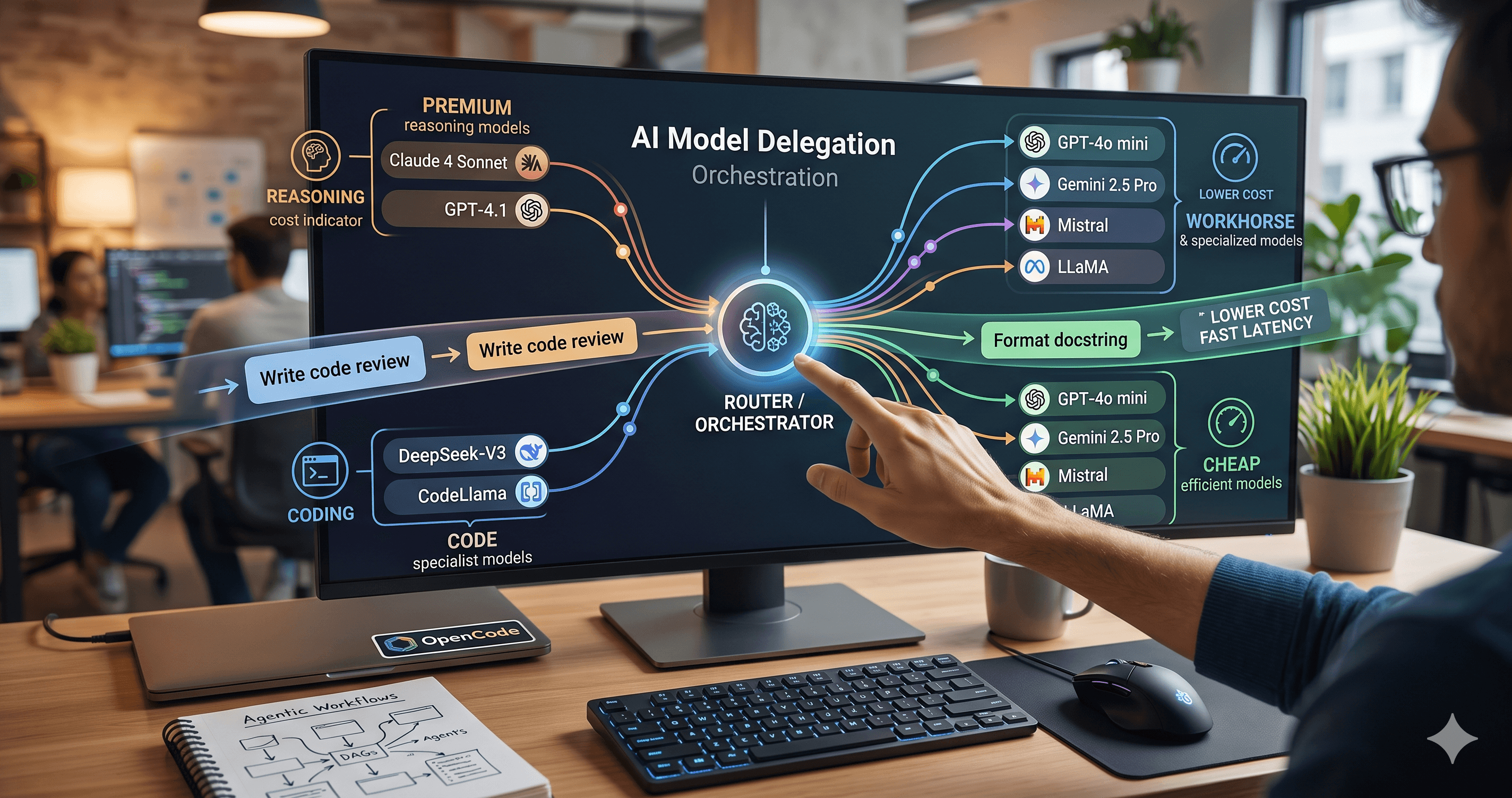
Beyond the single-model myth: Implementing intelligent multi-agent routing and DAG workflows with AI Dispatch.
Introduction: The Black Box of AI Code Generation When you ask GitHub Copilot to write a function, refactor a module, or explain a complex piece of code, the response you get is the output of a probab

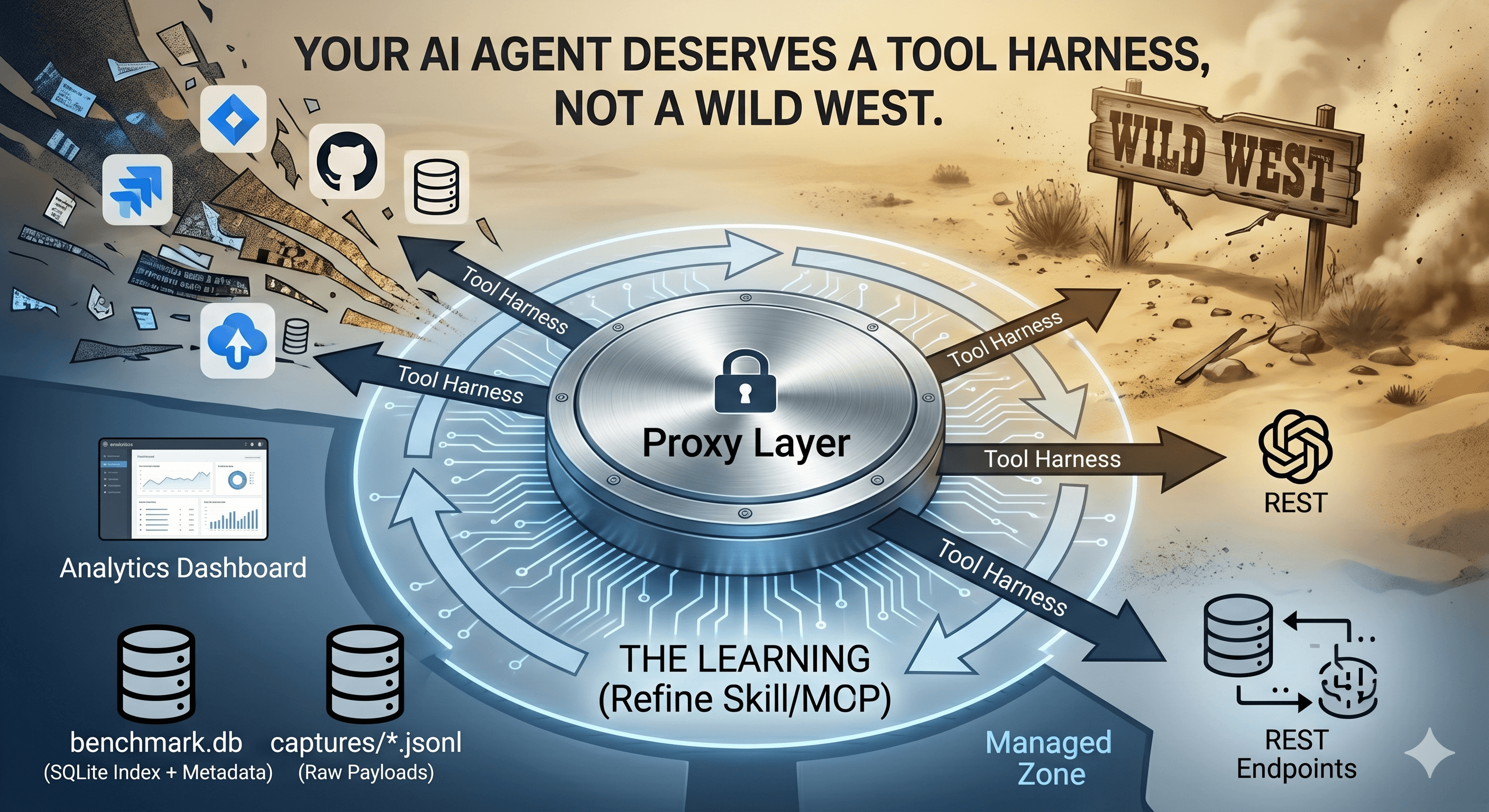
How we built a proxy-driven, benchmark-validated ecosystem for LLMs, and why your company's MCP servers and SKILLS should come with unit tests
As Large Language Models (LLMs) evolve into autonomous coding agents, one of the most consequential architectural decisions is deceptively simple: how should an AI agent talk to external services?
Traditionally, we gave LLMs terminal access and let them invoke Command Line Interfaces (CLIs). But in late 2024, Anthropic introduced the Model Context Protocol (MCP), marketed as the "USB-C of AI", a structured alternative that lets agents interact with services via typed JSON schemas rather than shell commands and plain text output. The hype was immediate and enormous. Thousands of MCP servers were published within weeks, and every AI assistant rushed to add support.
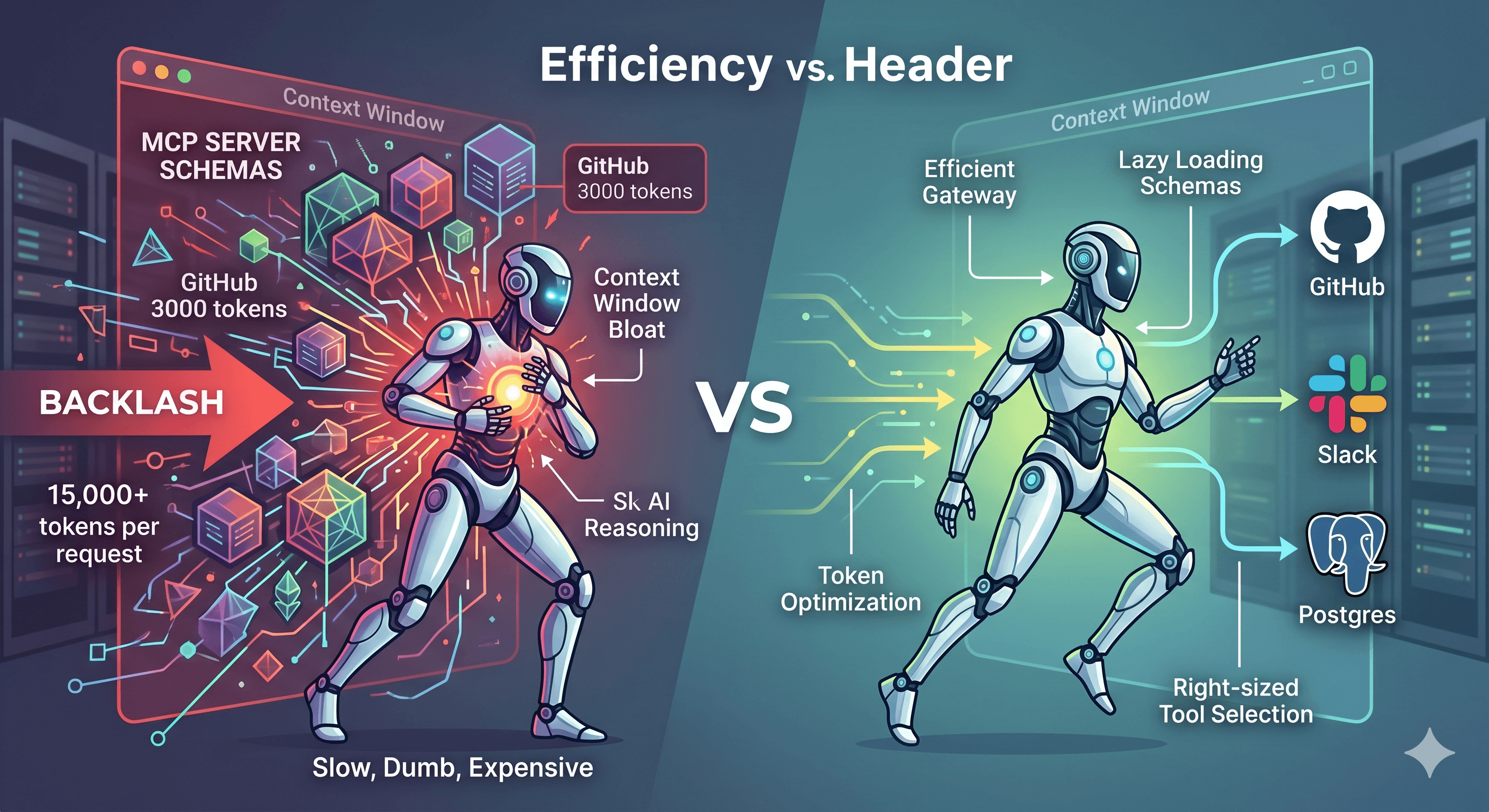
But in 2025, a quiet counter-current began to emerge. Developers building real agentic systems started noticing something uncomfortable: the more MCP servers they connected, the slower, dumber, and more expensive their agents became.
The core complaint is what engineers have started calling "context window bloat". Unlike CLI tools, which an LLM can explore lazily via --help, MCP requires all registered tool schemas to be injected into the system prompt upfront. A single GitHub MCP server with ~35 endpoints contributes roughly 3,000 tokens of tool definitions to every single request, before the agent writes a single line. Connect five MCP servers (GitHub, Slack, Kubernetes, Linear, Postgres) and you're burning 15,000+ tokens per request just describing tools the agent may never call. At scale, this can consume 25–50% of the entire context window before the agent begins reasoning.
Researchers at lunar.dev documented another failure mode: tool-space interference. As tool counts rise, agents struggle to distinguish between similarly named tools (e.g., get_status, fetch_status, query_status), causing poor tool selection and cascading failures. Meanwhile, discussions on Reddit and communities like The New Stack are increasingly questioning whether MCP's architectural overhead is justified for local or single-service workflows.
The developer community has also noted that frontier models are already heavily trained on common CLI tools, git, gh, kubectl, curl, often knowing the right flags without any schema description at all. As chrlschn.dev observed: "Progressive disclosure via --help might actually be more token-efficient than loading a 3,000-token schema you only use once."
So: is the MCP backlash justified? Or are developers throwing the baby out with the bathwater? We ran a real experiment to find out, testing identical GitHub operations across four distinct approaches with measured token data.
We tested four distinct modalities for completing identical GitHub operations:
| ID | Approach | Description |
|---|---|---|
| A | gh CLI (raw) |
Shell commands, plain-text output |
| A2 | gh CLI + Skill |
Shell commands guided by a skill.md file |
| B | Native GitHub MCP | Directly injected JSON tool schemas |
| C | Nexus-Dev Gateway | Single routing tool, schemas loaded lazily |
Each modality performed the same four operations:
Create a new public repository
Create an issue: "Test Issue for Evaluation"
Post a comment on the issue
List and retrieve the open issues
All four phases succeeded without errors. But looking at the token consumption tells a very different story.
Measurement method: Characters divided by 4, matching the cl100k_base tokenizer approximation used by most frontier LLMs.
| Modality | Input Tokens | Output Tokens | Total |
|---|---|---|---|
| CLI (raw) | 74 | 150 | 224 |
| CLI + Skill | 95 | 149 | 244 |
| Native MCP | 86 | 121 | 207 |
| Nexus Gateway | 135 | 111 | 246 |
| Modality | Schema Overhead |
|---|---|
| CLI (raw) | 0 tokens — no upfront schema |
| CLI + Skill | 480 tokens — skill file loaded once |
| Native MCP | ~3,062 tokens — all 35 tool schemas always present |
| Nexus Gateway | ~20 tokens — single router schema |
For a session with N operations:
| Modality | Formula | N=10 | N=50 | N=200 |
|---|---|---|---|---|
| CLI (raw) | 224N |
2,240 | 11,200 | 44,800 |
| CLI + Skill | 480 + 244N |
2,920 | 12,680 | 49,280 |
| Native MCP | 3,062 + 207N |
5,132 | 13,412 | 44,462 |
| Nexus Gateway | 20 + 246N |
2,480 | 12,320 | 49,220 |
Before MCP was widely adopted, teams developed skill files, structured markdown documents injected into the LLM's context that document exact commands, flags, and output formats. Think of it as a mini-manual the agent reads before acting.
The full skill file used in this experiment is available as a public Gist: github-cli.skill.md
# Skill: GitHub CLI (`gh`) Operations
## Issue Operations
# Always prefer --json for structured output:
gh issue list -R <owner>/<repo> --json number,title,body,state,comments
gh issue create -R <owner>/<repo> --title "<title>" --body "<body>"
gh issue comment <issue-number> -R <owner>/<repo> --body "<comment>"
Without the skill (gh issue list), the LLM receives:
Showing 1 of 1 open issue in mmornati/mcp-cli-test-repo

ID  TITLE                      LABELS  UPDATED
#1  Test Issue for Evaluation          less than a minute ago
→ ASCII table with alignment whitespace. No machine-readable structure. Dates are relative ("less than a minute ago"), not parseable timestamps. Plus upgrade noise.
With the skill (gh issue list --json number,title,body,state,comments):
[{"body":"This is a test issue created via CLI with Skill","comments":[{"id":"IC_kwD...","body":"This is a comment via CLI with Skill","createdAt":"2026-04-27T19:04:12Z"}],"number":1,"state":"OPEN","title":"Test Issue for Evaluation"}]
→ Structured, parseable, no noise. Absolute timestamps. Machine-readable IDs.
The skill file costs 480 tokens upfront. In exchange, per-operation output quality improves dramatically.
CLI vs. CLI+Skill cross-over: The skill overhead is recovered after ~24 operations within a session, after which output token reduction compounds.
The real gain from the skill isn't just tokens, it's eliminating the discovery loop where the LLM has to run gh --help or gh issue --help to find flags. Each help invocation typically costs an additional 400–800 tokens of output to parse.
With the GitHub MCP server, the LLM doesn't need to discover anything. Every tool is pre-described in the system prompt:
// Input — compact and typed:
{"body": "This is a test issue", "method": "create", "owner": "mmornati", "repo": "mcp-native-test-repo", "title": "Test Issue for Evaluation"}

// Output — clean JSON, no table formatting:
{"id": "4338179062", "url": "https://github.com/mmornati/mcp-native-test-repo/issues/1"}
The per-interaction token cost is the lowest of all four modalities (207 tokens). However, the 3,062 token fixed overhead is significant, and it's always there, even when the agent isn't using GitHub at all.
If your AI assistant has 5 MCP servers active (GitHub, Slack, Kubernetes, Linear, Postgres), you're paying 15,000+ tokens per request just to describe tools the agent may never call. At scale with long-running sessions, this quickly becomes the dominant cost.
The Nexus-Dev gateway approach is architecturally elegant: inject a single routing tool (invoke_tool) with ~20 tokens of schema overhead, and let the agent request tool schemas on demand when it needs them.
// The agent dispatches to any server with one tool:
{"server": "github", "tool": "issue_write", "arguments": {"owner": "mmornati", ...}}
The per-operation tokens are slightly higher (246) because each call includes the routing envelope, but the fixed overhead is essentially zero regardless of how many backend servers are configured.
All the numbers above measure the cost of calling GitHub. But that's not how real coding sessions work.
When a developer opens Claude Code, Cursor, or Antigravity and starts a feature, the actual pattern looks like this:
Prompt 1: "Fetch issue #42 and help me plan the implementation" → 1 GitHub op
Prompts 2–19: Coding, debugging, refactoring, tests, code review questions → 0 GitHub ops
Prompt 20: "Create a PR with my changes and link it to the issue" → 1 GitHub op
In this 20-prompt session, GitHub was called twice. But some of our modalities charge you for GitHub on every single prompt, whether you call it or not.
This is the critical question: when is the overhead paid?
| Modality | When is overhead charged? |
|---|---|
| CLI (raw) | Only when a gh command is actually run |
| CLI + Skill (on-demand) | Once, when the developer explicitly invokes it |
CLI + Skill (always-on, e.g. in .cursorrules) |
Every prompt |
| Native GitHub MCP | Every prompt (schemas always in system prompt) |
| Nexus Gateway | Every prompt, but only ~20 tokens |
The following table shows the real total token cost for a dev session where GitHub is called exactly twice (fetch issue + create PR), and the rest of the session is pure coding:
| Session length | CLI (raw) | CLI+Skill (on-demand) | CLI+Skill (always-on) | Native GitHub MCP | Nexus Gateway |
|---|---|---|---|---|---|
| N=5 prompts | 448 | 968 | 2,888 | 15,724 | 592 |
| N=10 prompts | 448 | 968 | 5,288 | 31,034 | 692 |
| N=20 prompts | 448 | 968 | 10,088 | 61,654 | 892 |
| N=50 prompts | 448 | 968 | 24,488 | 153,514 | 1,492 |
| N=100 prompts | 448 | 968 | 48,488 | 306,614 | 2,492 |
Data generated by
session_token_model.py. Token approximation: 1 token ≈ 4 chars.
The numbers are staggering. In a 50-prompt dev session with 2 GitHub operations:
CLI (raw) costs 448 tokens total for GitHub, exactly what those 2 calls require.
Nexus Gateway costs 1,492 tokens, still negligible.
Native GitHub MCP costs 153,514 tokens, of which 99.7% is wasted on schema descriptions the agent never needed for 48 of the 50 prompts.
For a 20-prompt session with 2 GitHub operations, the Native MCP breakdown is:
| Tokens | % of total | |
|---|---|---|
| Schema overhead (3,062 × 20 prompts) | 61,240 | 99.3% |
| Actual GitHub work (2 ops × 207 tokens) | 414 | 0.7% |
| Total | 61,654 |
For every 1 token of real GitHub work done, Native MCP charges you 148 tokens in schema tax.
For completeness, here is the same session (N=20 prompts) with different GitHub call frequencies:
| GitHub ops (G) | CLI (raw) | CLI+Skill (on-demand) | Native GitHub MCP | Nexus Gateway |
|---|---|---|---|---|
| G=1 (fetch only) | 224 | 724 | 61,447 | 646 |
| G=2 (fetch + PR) | 448 | 968 | 61,654 | 892 |
| G=5 (active use) | 1,120 | 1,700 | 62,275 | 1,630 |
| G=10 (heavy use) | 2,240 | 2,920 | 63,310 | 2,860 |
| G=20 (every prompt) | 4,480 | 5,360 | 65,380 | 5,320 |
Notice that increasing GitHub calls from G=1 to G=20 barely moves the Native MCP number (61,447 → 65,380) because the schema overhead dominates completely. The Nexus Gateway, by contrast, scales almost linearly with actual usage.
When a skill file is stored in a project-level configuration (like Cursor's .cursorrules, Claude Code's CLAUDE.md, or Antigravity's skill registry), it is injected into every prompt automatically, meaning it behaves like always-on, costing 480 tokens × N prompts. However, if the developer explicitly references the skill file only when performing GitHub operations (on-demand), it costs just 480 tokens once per session. The on-demand model is far more efficient but requires developer discipline.
| Criterion | CLI | CLI + Skill | Native MCP | Gateway MCP |
|---|---|---|---|---|
| Setup complexity | ✅ None | ✅ Minimal | ⚠️ Schema authoring | ⚠️ Gateway config |
| Per-op tokens | ✅ Low | ✅ Low | ✅ Lowest | ⚠️ Moderate |
| Fixed overhead per prompt | ✅ Zero | ✅ Zero (on-demand) | ❌ ~3,062 tokens | ✅ ~20 tokens |
| Session cost (N=20, G=2) | ✅ 448 | ✅ 968 | ❌ 61,654 | ✅ 892 |
| Output reliability | ❌ Brittle text | ⚠️ Better w/ --json |
✅ Typed JSON | ✅ Typed JSON |
| Multi-service scale | ✅ Fine | ✅ Fine | ❌ Explodes context | ✅ Scales linearly |
| Discovery overhead | ❌ High (--help loops) |
✅ Eliminated | ✅ Eliminated | ✅ On-demand |
| Best for G/N ratio | < 5% | 5–15% | > 40% | 5–40% |
Use raw CLI when:
The service has G/N < 5% (called rarely in a session).
Running one-off scripts in constrained environments.
Use CLI + Skill (on-demand) when:
The service has G/N < 15% but you need reliable structured output.
You want zero overhead except when the service is actually invoked.
⚠️ Do not put the skill file in .cursorrules or CLAUDE.md, that makes it always-on and costs 480 tokens × N prompts.
Use Native MCP when:
The service has G/N > 40% (called on nearly every prompt).
You have fewer than 2–3 MCP servers loaded simultaneously.
Examples: file system tools, memory/context stores, local databases in data-heavy sessions.
Use a Gateway MCP when:
The agent uses many different services at varying frequencies.
You want MCP-quality structured outputs for medium-frequency services (G/N 5–40%).
This is the recommended default architecture for general-purpose coding agents.
Given everything we've measured, here is a practical framework for setting up your AI coding environment, whether you're using Claude Code, Cursor, Antigravity, or any similar agent.
For any external service, ask: "In a typical session of N prompts, how many prompts (G) will actually call this service?"
| G/N Ratio | Interpretation | Recommended Approach |
|---|---|---|
| > 40% | Core to almost every prompt | Native MCP (overhead amortizes quickly) |
| 15–40% | Used regularly but not constantly | Gateway MCP |
| 5–15% | Occasional use | Gateway MCP or CLI+Skill (on-demand) |
| < 5% | Rare, session-bookend use | CLI or on-demand skill |
For context: GitHub in a standard feature implementation session has G/N ≈ 10% (2 ops in 20 prompts). That puts it firmly in the "occasional use" zone, which is why Native MCP is such a poor fit despite its per-op efficiency.
Not all services are equal. Here's how common MCP-compatible services break down by typical G/N ratio:
| Service | Why it’s high-frequency | CLI Alternative |
|---|---|---|
| File system / code search | Called on nearly every coding prompt | find, grep, cat |
| Memory / context stores (e.g. Nexus) | Constantly queried for project context | — |
| Browser / web rendering | Frequent in front-end sessions | curl (limited) |
| Local database | Core when session is data-focused | psql, sqlite3 |
| Code index / embeddings | Queried for every "find similar" request | — |
For these, the schema overhead amortizes quickly and Native MCP's structured outputs provide real value on every prompt.
| Service | Typical ops/session | Best approach |
|---|---|---|
| Linear / Jira | Fetch board + update tickets | ~5–10 ops |
| Slack / Teams | Check thread, post update | ~2–5 ops |
| Notion / Confluence | Look up docs, update notes | ~2–5 ops |
| Sentry / Datadog | Investigate errors during debug | ~3–8 ops |
| npm / PyPI registry | Check versions when adding deps | ~2–6 ops |
For these, Native MCP schema overhead is hard to justify. A Gateway MCP gives you structured outputs without the fixed cost.
| Service | Typical use in a session | Better approach |
|---|---|---|
| GitHub | Fetch issue at start, create PR at end | CLI + on-demand skill |
| Kubernetes / Helm | Deploy once at the end of a feature | kubectl + skill |
| AWS / GCP / Azure | Infra provisioning, rarely mid-session | aws/gcloud CLI |
| Stripe / payment APIs | Verify test payments occasionally | curl to API |
| DNS / domain tools | One-off lookups | dig, nslookup |
For these, the Native MCP schema tax is almost entirely wasted. CLI with a skill file loaded on-demand costs zero overhead when idle and delivers clean structured JSON when explicitly invoked.
Step 1: Audit your MCP config. For each server, estimate G/N. A typical config that naively loads 5 servers wastes ~15,000 tokens per prompt:
// BEFORE: 5 servers = ~15,000 tokens/prompt in schema overhead
{
  "mcpServers": {
    "github":     { "command": "npx", "args": ["@github/mcp-server"] },
    "kubernetes": { "command": "npx", "args": ["mcp-server-kubernetes"] },
    "slack":      { "command": "npx", "args": ["@slack/mcp-server"] },
    "aws":        { "command": "npx", "args": ["awslabs.aws-mcp-servers"] },
    "linear":     { "command": "npx", "args": ["linear-mcp-server"] }
  }
}
Step 2: Apply the G/N framework:
// AFTER: token-efficient configuration
{
  "mcpServers": {
    // ✅ Native MCP: G/N > 40%, core to every prompt
    "memory":        { "command": "npx", "args": ["@modelcontextprotocol/server-memory"] },
    "filesystem":    { "command": "npx", "args": ["@modelcontextprotocol/server-filesystem"] },

    // ✅ Gateway: routes to slack, linear, sentry on-demand; single ~20-token schema
    "nexus-gateway": { "command": "npx", "args": ["nexus-dev-gateway"] }

    // ✅ github, kubernetes, aws → moved to CLI with on-demand skill files
  }
}
Step 3: Store skill files per-service, invoke on-demand:
project/
├── .skills/
│   ├── github-cli.skill.md       ← invoke when doing GitHub ops
│   ├── kubernetes.skill.md       ← invoke when deploying
│   └── aws-cli.skill.md          ← invoke when touching infra
├── CLAUDE.md                     ← only truly global rules here (keep minimal)
⚠️ Never put skill files in
.cursorrulesorCLAUDE.mdunless you want them loaded on every prompt. Always-on skill files behave like miniature MCP schemas, costing 480 tokens × N prompts across your session.
The session-frequency framework applies consistently across the ecosystem:
| Service | CLI | MCP Server | Typical G/N | Recommendation |
|---|---|---|---|---|
| GitHub | gh |
github-mcp-server | ~5–10% | CLI + on-demand skill |
| Kubernetes | kubectl |
kubernetes-mcp-server | ~2–5% | CLI + on-demand skill |
| PostgreSQL | psql |
postgres-mcp-server | ~40–80% (data sessions) | Native MCP if data-heavy |
| Slack | curl + API |
slack-mcp-server | ~10–20% | Gateway MCP |
| Linear / Jira | curl + API |
linear-mcp-server | ~15–25% | Gateway MCP |
| AWS | aws CLI |
awslabs aws-mcp | ~2–5% | CLI + on-demand skill |
| Sentry | curl + API |
sentry-mcp-server | ~10–30% | Gateway MCP |
| Filesystem / Memory | find, cat |
mcp-server-memory | ~60–90% | Native MCP |
The right answer depends on your session type. A PostgreSQL-heavy data analysis session has a completely different G/N profile than a feature implementation session where you only touch the database at the end for a schema migration.
Everything measured so far assumes that the LLM always picks the right tool, uses the correct flags, and generates valid parameters on the first attempt. In reality, it does not.
This is an important caveat. Our token numbers are lower bounds, they represent the ideal case. Real-world agentic sessions are messier.
The Berkeley Function Calling Leaderboard (BFCL) is the most widely cited benchmark for tool-use accuracy. Key findings from 2024–2025:
Simple, single-turn function calls: Top models (GPT-4o, Claude 3.5/4, Gemini) achieve >90% accuracy in well-defined, isolated scenarios.
Complex, multi-turn, agentic tasks: Accuracy drops significantly, BFCL v4 (2025–2026) shows an average of ~58% across all models, with top models scoring ~73% on the comprehensive test suite.
Relevance detection (knowing when not to call a tool) remains a consistent weak point.
These numbers don't directly map to our scenarios, but they establish an important baseline: even top models fail to pick or call the right tool correctly 10–40% of the time in complex, multi-tool environments.
When an agent picks the wrong tool or uses wrong parameters, the typical failure cycle looks like:
1. Agent generates wrong tool call / flag             → ~100 tokens output
2. Tool returns error message                         → ~50–200 tokens input
3. Agent reasons about the error and retries          → ~150 tokens output
4. (Repeat 1–3 until correct or max retries)
A single recoverable error costs approximately 300–600 extra tokens. Research on ReAct-style agents shows that in some pipelines, over 90% of retry attempts target errors that are structurally impossible to fix (hallucinated tool names, invalid parameters), meaning the agent burns tokens on loops that can only end in a human intervention or hard reset.
| Modality | Primary failure mode | Retry overhead | Why |
|---|---|---|---|
| CLI (raw) | Hallucinated flags, wrong subcommand | High | Text-only interface; agent infers syntax from training data alone |
| CLI + Skill | Wrong flag despite skill guidance | Medium | Skill pre-empts most common mistakes; some edge cases remain |
| Native MCP | Wrong tool selection from large schema | Medium-Low | Typed schema prevents parameterization errors; tool confusion risk grows with schema size |
| Nexus Gateway | Misrouted request | Low | Single router with clear semantic labels; schema enforced downstream |
The counterintuitive finding from research: Native MCP actually has lower parameterization error rates than raw CLI for the same service, because the LLM receives a precise, typed function signature instead of inferring flags from documentation. The schema overhead is costly, but it does reduce one class of errors.
Without precise empirical data for our specific workflows, we can estimate the error-adjusted token cost using a conservative assumption: in a real coding session, the agent makes ~1 recoverable error per 5 GitHub-related operations (a 20% error rate, consistent with mid-range BFCL performance on agentic tasks).
With G=2 GitHub operations per session, this rounds to approximately one extra error/retry cycle per 2–3 sessions, so the per-session error overhead is small but non-zero:
| Modality | Ideal session cost (N=20, G=2) | Error-adjusted estimate (+1 retry per session @ 400t) |
|---|---|---|
| CLI (raw) | 448 | 848 (+89%) |
| CLI + Skill (on-demand) | 968 | 1,168 (+21%) |
| Native MCP | 61,654 | 61,954 (+0.5%) |
| Nexus Gateway | 892 | 1,092 (+22%) |
Key observation: Error overhead hits CLI (raw) hardest in relative terms (+89%), because there is no schema to catch bad parameters before execution. For Native MCP, the error adjustment is statistically invisible (0.5%), because the schema tax already dominates by orders of magnitude.
⚠️ Methodology note: All token numbers in this post represent the happy-path, single-attempt scenario. The error-adjusted estimates above are extrapolated from BFCL benchmark data and general research on ReAct-style agents. They are approximations, not measured values. Real error rates vary significantly based on model, prompt quality, schema clarity, and task ambiguity. Your mileage will vary.
Our experiment with real GitHub operations, creating repos, opening issues, posting comments, and querying results, confirms that the MCP backlash is partially right, but misses the real solution.
The isolated per-operation cost tells one story:
| Modality | Per-op tokens | Session overhead |
|---|---|---|
| CLI (raw) | 224 | 0 |
| CLI + Skill (on-demand) | 244 | 480 (once) |
| Native GitHub MCP | 207 | 3,062 per prompt |
| Nexus Gateway | 246 | 20 per prompt |
But the real dev session cost (N=20 prompts, G=2 GitHub ops, fetch issue + create PR) tells the story that actually matters:
| Modality | Real session cost | vs. CLI baseline |
|---|---|---|
| CLI (raw) | 448 tokens | — |
| CLI + Skill (on-demand) | 968 tokens | 2.2× |
| Nexus Gateway | 892 tokens | 2.0× |
| CLI + Skill (always-on) | 10,088 tokens | 22× |
| Native GitHub MCP | 61,654 tokens | 137× |
At N=50 prompts, Native MCP reaches 153,514 tokens for the same 2 GitHub calls, with 99.7% wasted on schema descriptions that were never needed.
1. The MCP backlash is real, but the target is wrong. The problem isn't the protocol. It's the native injection pattern, loading every schema into every prompt. Returning to raw CLI trades one set of problems (schema bloat) for another (brittle text output, --help discovery loops).
2. Service frequency (G/N ratio) is the missing variable in every MCP vs. CLI debate. GitHub has G/N ≈ 5–10% in a typical dev session, it belongs in the CLI+skill zone. File system tools and memory stores have G/N > 60%, they belong in the Native MCP zone. Design your toolchain around your actual usage patterns, not the hype cycle.
3. The gateway pattern is the right default architecture. Near-zero fixed overhead (~20 tokens/prompt), MCP-quality structured outputs, and linear scaling regardless of how many backend services you configure. Pair it with on-demand skill files for low-frequency CLI services, and keep Native MCP only for the tools your agent calls on nearly every prompt.
The question every team building AI agents should be asking is not "should we use MCP?" but: "What is the G/N ratio of this service in our sessions, and are we paying the schema tax unnecessarily?"
All tests were run using the GitHub CLI v2.89.0, the github-mcp-server, and the nexus-dev gateway on macOS. The CLI skill file is published as a public Gist. Token estimates use the 1 token ≈ 4 characters approximation (cl100k_base).