

If you’ve been using MCP servers with Cursor, VS Code, or other AI-powered IDEs, you’ve probably encountered this dreaded warning:
⚠️ “You have configured more than 50 tools. This may degrade performance.”
Modern AI coding agents connect to multiple MCP (Model Context Protocol) servers: GitHub, PostgreSQL, Filesystem, Slack, Jira… Each server exposes multiple tools. Before you know it, you’re at 50+ tools, and your AI agent starts struggling.
In this article, I’ll explain why this happens and how Nexus-Dev solves it with a Gateway architecture that reduces tool count from 50+ down to just 11.
Quick Context: What is MCP?#
MCP (Model Context Protocol) is a standard introduced by Anthropic in November 2024 that allows AI assistants to connect to external tools and data sources. When you install a GitHub MCP server, your AI can create issues, open PRs, and manage repositories.
The problem? Each MCP server adds more tools to your AI’s context, and there’s a limit to how many tools work well together.
The Problem: Tool Explosion#
How Tools Consume Context#
When you configure MCP servers, each tool’s definition (name, description, parameters) gets injected into the AI’s context window:
| MCP Server | Typical Tools |
|---|---|
| GitHub | 15-20 (issues, PRs, repos…) |
| PostgreSQL | 5-10 (query, tables…) |
| Filesystem | 8-12 (read, write, list…) |
| Slack | 10-15 (messages, channels…) |
5 servers × 10 tools = 50 tools consuming precious context.
Why Performance Degrades#
Research shows that AI accuracy can drop from 87% to 54% with context overload. Each tool definition takes tokens away from your actual code and conversation. Platforms like Cursor enforce a hard limit around 40-50 tools to prevent this.
But What About Per-Project Configuration?#
Modern IDEs now support project-level MCP configuration:
VS Code:
.vscode/mcp.jsonCursor:
.cursor/mcp.json
This is better than global configuration: you only load relevant servers per project. But even a typical full-stack project might need GitHub + Database + Cloud + Monitoring + Communication tools. That’s still 40+ tools for a single project.
The Solution: Nexus-Dev as a Gateway#
Instead of exposing all tools directly, Nexus-Dev acts as a gateway: a single MCP server that proxies requests to any number of backend servers.
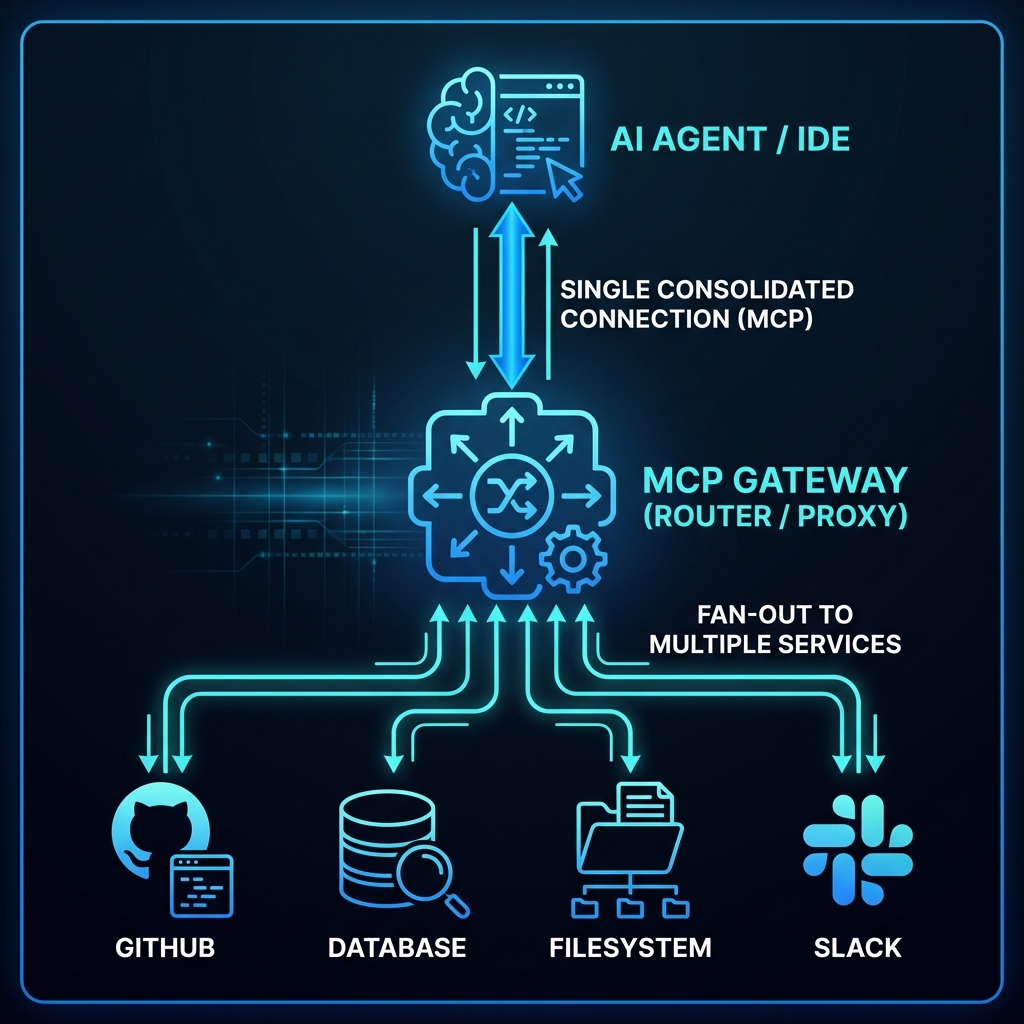
The key insight: Your AI agent only sees 11 tools, but can access all 50+ through dynamic discovery.
How It Works#
AI asks: “I need to create a GitHub issue”
Nexus-Dev searches its RAG index: finds
github.create_issueAI invokes:
invoke_tool("github", "create_issue", {...})Nexus-Dev proxies the request to GitHub MCP
Result returned to AI
All through just 11 gateway tools, not 50+.
The 11 Gateway Tools#
Instead of exposing 50+ tools directly, your AI sees:
RAG Tools (7): from the previous article:
search_code,search_docs,search_lessons,search_knowledgeindex_file,record_lesson,get_project_context
Gateway Tools (4): for accessing any backend:
| Tool | What It Does |
|---|---|
list_servers | Show available MCP backends |
search_tools | Find tools via semantic search |
get_tool_schema | Get full parameter schema |
invoke_tool | Execute tool on any backend |
Implementation: How It Works#
1. Index Tool Documentation#
First, index all your MCP servers’ tools into the RAG database:
# Index all configured servers
nexus-index-mcp --all

# Or index a specific server
nexus-index-mcp --server github
This stores each tool’s description and schema for semantic search.
2. Semantic Tool Discovery#
When the AI asks “how do I create a GitHub issue?”, it calls search_tools:
# search_tools("create github issue")
# Returns: github.create_issue - Creates a new issue
#          Parameters: owner, repo, title, body...
The AI finds the right tool by meaning, not by knowing every tool name upfront.
3. Tool Invocation with Error Handling#
# AI invokes through the gateway
invoke_tool("github", "create_issue", {
    "owner": "mmornati",
    "repo": "nexus-dev",
    "title": "Fix login bug"
})
Nexus-Dev handles:
Connection pooling and reuse
Automatic retry with exponential backoff
Configurable timeouts
Clean error messages
4. Server Configuration#
Servers are configured in .nexus/mcp_config.json:
{
  "version": "1.0",
  "servers": {
    "github": {
      "transport": "stdio",
      "command": "npx",
      "args": ["-y", "@modelcontextprotocol/server-github"],
      "env": {
        "GITHUB_PERSONAL_ACCESS_TOKEN": "${GITHUB_TOKEN}"
      }
    },
    "postgres": {
      "transport": "stdio",
      "command": "npx",
      "args": ["-y", "@modelcontextprotocol/server-postgres", "postgresql://..."]
    }
  }
}
Two transport types supported:
stdio: Local processes (npm packages, python scripts)
sse: Remote HTTP servers (cloud-hosted MCP endpoints)
Quick Setup#
# Import from your existing global MCP config
nexus-mcp init --from-global

# Or add servers manually
nexus-mcp add github --command "npx" --args "-y" \
  --args "@modelcontextprotocol/server-github"

# Index all tool documentation
nexus-index-mcp --all
Update your IDE to use only Nexus-Dev:
{
  "mcpServers": {
    "nexus-dev": { "command": "nexus-dev" }
  }
}
That’s it. One server. 11 tools. Access to everything.
Before vs After#
Before: Traditional Setup#
IDE Config:
  github:         (15 tools)
  postgres:       (8 tools)
  filesystem:     (10 tools)
  slack:          (12 tools)
  linear:         (8 tools)

Total: 53 tools in context
⚠️ Warning: Too many tools
After: Gateway#
IDE Config:
  nexus-dev:      (11 tools)

✅ All 53+ tools accessible via gateway
✅ Minimal context usage
✅ No performance degradation
Real Example#
You: "Create a GitHub issue for the login bug"

AI: Let me find the right tool...
    [search_tools("create github issue")]

    Found: github.create_issue

    [invoke_tool("github", "create_issue", {
        "owner": "mmornati",
        "repo": "nexus-dev",
        "title": "Fix login redirect loop",
        "labels": ["bug"]
    })]

    ✅ Issue #42 created
All through Nexus-Dev’s 11 tools.
Benefits Summary#
| Traditional | Gateway |
|---|---|
| 50+ tools in context | 11 tools in context |
| Configure each server in IDE | Configure only Nexus-Dev |
| IDE restart to add servers | nexus-mcp add dynamically |
| AI must know exact tool names | Semantic search finds tools |
Conclusion#
The MCP ecosystem is growing fast, and tool explosion is a real problem. By using Nexus-Dev as a gateway:
Your AI agent sees only 11 tools
It can access 50+ tools through semantic search
Context usage stays minimal
Configuration stays simple
Combined with the RAG capabilities from the previous article, Nexus-Dev becomes a complete solution for making your AI coding agent smarter and more efficient.
Nexus-Dev is open source: github.com/mmornati/nexus-dev